
DOWNLOAD THE APP


Customer Services
Copyright © 2025 Desertcart Holdings Limited
DOWNLOAD THE APP


🔥 Dominate your game and workspace with style and speed!
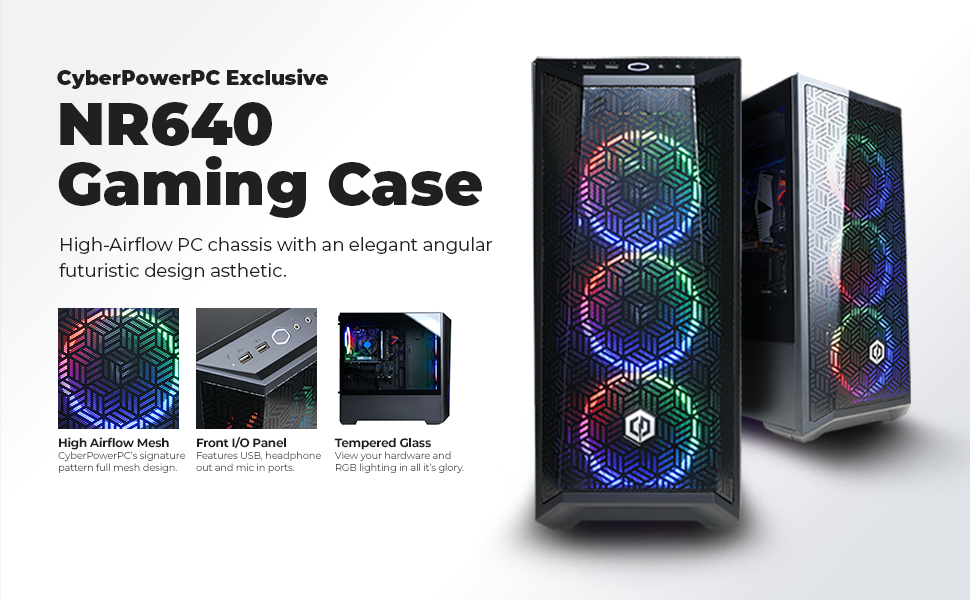
The CYBERPOWERPC Gamer Xtreme VR is a high-performance gaming desktop featuring a 6-core Intel i5-11400F processor, NVIDIA GeForce RTX 2060 6GB GPU, and 8GB DDR4 RAM. It boasts a lightning-fast 500GB NVMe SSD, Windows 11 Home pre-installed, and extensive connectivity options including WiFi and multiple USB ports. Designed for gamers and multitaskers alike, it combines powerful specs with a sleek tempered glass case and customizable RGB lighting, delivering a plug-and-play experience that elevates both gaming and productivity.





| ASIN | B09DHP9M9G |
| Best Sellers Rank | #81,959 in Computers & Accessories ( See Top 100 in Computers & Accessories ) #2,949 in Tower Computers |
| Brand | CyberpowerPC |
| Card Description | Dedicated |
| Chipset Brand | NVIDIA |
| Color | Black |
| Computer Memory Type | DDR4 SDRAM |
| Customer Reviews | 4.6 4.6 out of 5 stars (2,588) |
| Date First Available | August 24, 2021 |
| Flash Memory Size | 500 GB |
| Graphics Card Ram Size | 6 GB |
| Graphics Coprocessor | NVIDIA GeForce RTX 2060 |
| Hard Drive | 500 GB SSD |
| Hard Drive Interface | Solid State |
| Hard Drive Rotational Speed | 1 |
| Hardware Platform | Windows |
| Item Weight | 30.3 pounds |
| Item model number | GXiVR8060A11 |
| Max Screen Resolution | 1920x1080 |
| Memory Speed | 14 GHz |
| Number of Processors | 6 |
| Number of USB 2.0 Ports | 2 |
| Number of USB 3.0 Ports | 6 |
| Operating System | Windows 11 Home |
| Package Dimensions | 24 x 22.6 x 12.2 inches |
| Processor | 2.6 GHz core_i5 |
| Processor Brand | Intel |
| RAM | 8 GB DDR4 |
| Screen Resolution | 1920 x 1080 |
| Series | Gamer Xtreme VR |
| Standing screen display size | 0.1 |
| Wireless Type | 802.11ab |
J**U
Fantastic plug and play experience
Like the title said, buying this computer is a real plug and play experience. - Installation is easy and straight forward. I complete the installation under 30mins after watching the guide video from Cyberpower. Most time is actually spent on handle this large computer chasis. System has Windows 11 pre-installed. Sign-on experience is better than Windows 10. Nothing to say about it. - Gaming experience is fantastic! Have to say that gaming experience heavily depends on what hardware configuration you are getting with the purchase. My review is based on comparing this Cyberpower PC with my old gaming laptop. My Cyberpower has a RTX2060 GPU and latest intel i5. My old laptop is an Alienware M17 with GTX980M and an 6 years old Intel i7. Taking Valheim for example, I am doing 30 fps when running high graphic setting with 4k resolution. 50 fps running 2k and >60fps running 1080p (capped by monitor refresh rate). My Alienware struggles running at 60 fps at 1080p and fair about 15fps at 4k. To me, that's a big difference. - Noise is not an issue I have seen some customer complaining noise generated by this computer before I bought the computer. Those comments really concerned me before buying so here I want to share my personal take on this. To me, the noise doesn't affect my using experience. Can I hear it? Yes. Can I hear it when watching video/playing games? No. Again, I want to compare this Cyberpower PC with my old Alienware m17. When my Alienware m17 is pretty quiet when idle, Cyberpower PC did sound louder. That make sense because fans in a laptop doesn't run all the time, but fans on the Cyberpower Desktop run all the time. Not mentioning there 4 big fans in the Cyberpower PC (3 front and 1 back). Things really take a turn when running graphic heavy games. My old alienware is generating very loud noise running GTA5 at 1080p and I can clearly see the fans struggle to get rid of the heat. In comparison, I can't sense any increase on the noise level of the Cyberpower PC. For me, noise is not an issue. Also be aware that my PC is put on the floor instead of on the desk. - Lots of ports Another reason I want to purchase this desktop PC is the large amount of ports on it. I work at home often these COVID years. It is a huge pain that I have to unplug/replug my mouse, keyboard and two monitors every time I transit from my work laptop and my home PC. There may exist some kinds of magic docking system that fit my specific need/pain. But nobody told me that and I don't know how to do it for 3 years, until i get this Cyberpower PC. It has at least 4 USBs and both HDMI and Display port. Now I can use two monitors (one HDMI and one display port) at the same time and have them connected to both my work PC and home PC all the time. This may sound obvious to lots of people who own a desktop PC before. But for me who use laptops all the time, it is a huge performance upgrade. Overall, I recommend people to buy this PC for both gaming and personal use. Things I like about this PC are: Installation is easy and straight forward; Gaming experience is fantastic; Noise is not an issue; lots of ports. PS: It's surprising to me that PC nowadays has Wifi receiver build in (at least this Cyberpower PC did have wifi). I put my PC in the corner of the room and it still gets max signal strength. That's a plus.
P**R
Great Value
Great value for the price. Easy setup - plug in and play. Quick startup. It runs smoothly. I have had it my CyberPower PC for a couple of years now and had no issues.
B**.
Great PC as far as "Plug and Play" goes
As a PC gamer that has just returned to playing PC games, thanks to CyberPowerPC, this is a great all-around computer that is up to the task of handling current PC games. I have ordered a prebuilt computer before, from a different company, and my experience with CyberPowerPC has been great so far. The package it came in was neat and well-packaged with sufficient padding. It was extremely easy to set up and I had it up and running in about half an hour. The PC itself, with all of its RGB lighting, looks great! This model in particular boots up very quickly (< 30s) and allows for moderate multi-tasking. I downloaded Overwatch 2 and was able to play it on Ultra settings. I'm not sure how it runs other games, but it ran OW 2 flawlessly. I would suggest this computer and company to anyone who wants to jump into PC gaming quickly. Also, I typed up this review with the semi-mechanical keyboard that they provide and I'd say that it's better than your average keyboard. It was well worth the money!
J**S
Has its flaws, but good overall.*UPDATED*
The PC is superb for the price (got it on Black Friday for $876 before taxes). It was a little better than what I thought it was. And while it does have it's flaws, they're not exactly deal breakers. I got this PC a little over a week ago, and everything is running fine, so far. TLDR: The PC is good overall, and it can use some minor adjustments, a new CPU Cooler, some more RAM, and some more storage. And with a FRESH install of Windows 11, you don't have to worry about any bloatware. Some of these things are easy to do, so someone with a lack of experience can probably do so it's not a big issue, and that's why I recommend it for those who might not know much about PCs, but rather just want to do some gaming with good price to performance, or someone who wants to get their kid a brand new PC for Christmas or something. The exact specs I got: i5-11400F @2.6GHz with stock cooler EVGA RTX 2060 (not SC, sorry) single fan TeamGroup T-Force 1x8gb @ 3200MHz Thermaltake 600W 80+Gold Gigabyte B560 DS3H AC WD Blue SN550 NVMe SSD 500gb CPU Performance: Cinebench R20: ALL CORES: 3900 Cinebench R23: ALL CORES: 9969 SINGLE CORE: 1350 GPU PERFORMANCE: Unigine Heaven Benchmark (1080p, high): 5204 Unigine Heaven Benchmark(1080p, Ultra preset): 2346 The Pros: 1. It is a good value PC for what circumstances we are in right now(chip shortage) 2. Decent cable management. The cable management was well routed, and making the PC look very clean from the inside and the back. The main issue I had was that the basement kind of looked like a "rat's nest." 3. Good overall performance. The PC runs really well, with the CPU scoring 3900~ points on Cinebench R20, and 9969 points on Cinebench R23. I will do GPU benchmarks some time in the future, but as far as I'm concerned, it does fine with the games I threw at it. 4. Fresh Install of Windows 11 (no 3rd party bloatware). Prebuilt companies such as Dell, HP and Lenovo include a bunch of Bloatware that can effect performance. A video by Gamers Nexus showed that the bloatware on the G5 5000 was so bad that it used 30% of the GPU while idle. 5. Good airflow. The PC has 3 intake fans on the front with a mesh like design where it has a bunch of little holes enough to get cool air into the PC instead of having it closed off, and one exhaust fan, which are standard. 6. Excellent packaging. The packaging was excellent, it had foam packaging on the outside and the inside. This makes sure that none of the components are damaged while being shipped or delivered. The Cons: 1. The PC comes with the stock intel cooler, which is fine for web browsing, but I often times catch the cooler running really loud, even if its just at 40°C~. I would recommend switching it for a tower cooler with a 120mm fan or similar. I went with the Vetroo V5 cooler and it runs quite and performs well with 52°C-ish while running at max load 2. It only comes with 1 stick of ram. When you're paying at least $1k for a pc, it should be a common thing that it comes with 16gb(2x8gb), especially because 16gb is becoming the new standard. You can get a dual stick kit from PNY or something, or even just buy the same ram stick as the one in your build, unfortunately I couldn't find the exact one because it actually comes in a dual stick pack, and CyberPowerPC only put one of them. 3. The model that was chosen for the RTX 2060. As I mentioned in the parts breakdown above, the EVGA RTX 2060 only has one fan on it, and while this may not affect performance much, it might run hotter than your typical dual fan GPU. This also causes it to get louder because the single fan has to do more work whenever the GPU is reaching temperatures in the 60s, I found. It gets way louder when at full speed in comparison to my CPU fan. This is more of a nit pick, some others might not mind it or really care, but I just thought it might be something worth mentioning. Adding on to this - After tuning it on MSI Afterburner, the fan may be loud, but it does maintain a temp around 70°C, which is great. 4. Low storage. The PC only comes with 500gb of storage, and that's the boot drive alone. I would recommend getting an extra 1TB hard drive or something alike. I've done this already and added a 500gb SSD for games as well as 750gb HDD for anything else that doesn't really need the fast speed. It's really easy to do, so it's probably not that big of a deal to some. The computer is fine overall. It can be better though if it just made some small adjustments like getting a better CPU cooler and putting a 2nd stick of ram, and maybe a dual fan GPU, there is a dual fan version of the card in the specs, too. I would recommend it to those who might not know much about computers because, at least in my case, the PC really was just plug n' play. I will be updating my review if anything happens that might be noteworthy since it has only been a week, and I will possibly include GPU benchmark figures as well sometime in the future as well.
C**N
Purchased this CyberpowerPC since it was the best deal for a prebuilt I could find in Canada. I hadn't bought a desktop PC since 2006 which coincidentally was also a Cyberpower PC and I'm amazed at how things have changed. Computer came well put together with clean cable management inside. I've used it for a month now and everything seems to be going well. I have been gaming casually on it with GamePass. Played Star Wars Fallen Order on Ultra settings so I'm happy with that. Fast computer for my other needs. Only thing it might need is upgraded RAM since it only comes with 8GB, and maybe a CPU cooler other than the stock cooler, but so far my CPU and GPU temps haven't been pushing the limits at all. Might put another HDD in it for file storage down the road, but it has lots of space inside for upgrades. Overall, very happy with the purchase. RAM inside for me was TFORCE 8GB DDR4 3200 Power supply is a Thermaltake Smart 600w Gold 80 Plus The GPU has dual fans.
T**R
Exactly as the headline states, I don't think there's a better "bang for your buck" prebuilt PC out there at the moment, and at this price range.. As someone who hasn't had a desktop PC since I was a kid- this meets all my needs, for building onto (or salvaging parts in the more distant future) and for simply plug-and-play/personal use, and as others have mentioned- no proprietary parts, no bloatware! Considering it comes with a mouse and keyboard (both seem decent, nothing fancy but they'll do the job and feel alright), the only thing you need is a monitor or TV of some kind, and you'll be running things (and hopefully adding on more RAM/storage) comfortably. My only complaint is, for such a great starting package to building off of- clearly many other reviewers agree- they really ought to list what other specific parts are used (I mean, they're assembling it- it'd not be hard to have a itemization tied to the serial # online or otherwise coming on a slip of paper alongside the setup instructions). There's clearly some variation in what parts you might receive other than the GPU and CPU, going off of reviews (but those two parts, and the general "completeness" of the setup for its value are the real selling point). That's all the more reason to provide such info with the product, after the purchase, IMO- the fiddling around trying to find the make of each part is a hassle when one's setting it up and making plans where to proceed from here, anyways.
L**.
Performance is great starting off, the keyboard and mouse were a great addition to help get me situated quickly, but the RGB fans came disconnected from the power supply which became a problem that took me a day to figure out how to reconnect it having no experience with desktop dismantling, details below; I had initially thought that I maybe needed to install some drivers first to get the fans to work, but to no avail. And while the quick start guide that comes with the box does say to open the tower on the *glass side* to check if anything has disconnected, it never specifies that you can (and probably should) open the opposite side of the tower, the side that hides the power supply and a bunch of extra wires within the underside of the tower. At first glance and moving around some wires I still wasn't able to find the fans cords, as I expected them to be connected to the motherboard and spent the majority of my time trying to find cords on the glass side that were either loosely disconnected or lying around the motherboard. It took me until the next morning to find the disconnected parts hidden among the cord spaghetti in the underside. I've had a couple days since then, computer works great and stays cool without much noise. Wish there was a place to install an internal HDD though.
J**A
I bought this computer! And it works great!
J**S
I am a trader using tradestation. I needed a very fast cpu to perform with this software properly without it being excessively slow like my old one. Now with this computer I am able to perform all my scans and to view multiple charts accross 6 monitors and it works exceedingly fast. It's a great trading computer at 1/5 the price trading computers go for. The stock CPU fan that came with the unit, was a little noisy. That was resolved with a cheap purchase of a different CPU cooling fan which eliminates all the noise. I am very happy with my purchase in fact I can safely say this is the best computer purchase I have ever made. Value for money, unbeatable!!!
Trustpilot
3 days ago
2 months ago