Desert Online General Trading LLC
Dubai, United Arab Emirates
Desert Online General Trading LLC
Dubai, United Arab Emirates

🔐 Upgrade your door, upgrade your lifestyle.
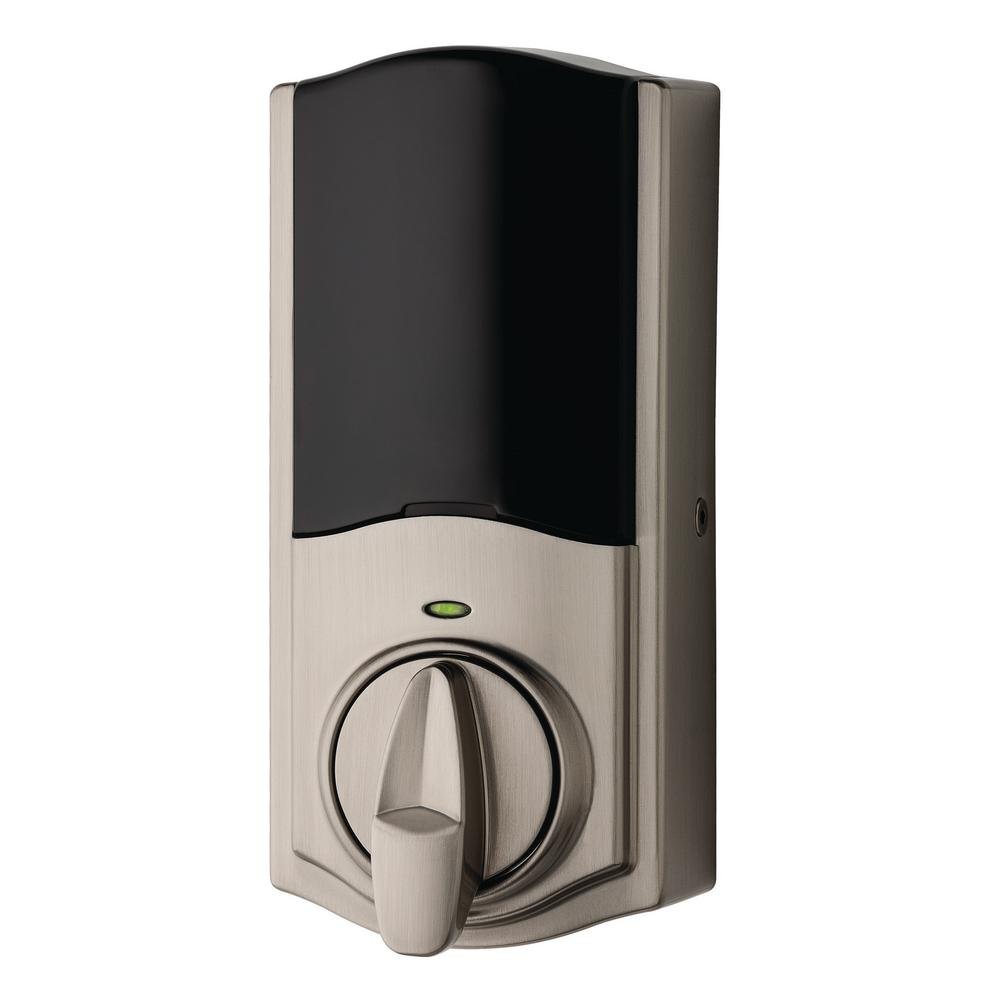
The Kevo Smart Lock Conversion Kit by Kwikset converts your existing deadbolt into a keyless, Bluetooth-enabled smart lock compatible with major brands. It supports voice commands via Alexa, offers optional auto-locking, and can be remotely controlled with the Kevon Plus Hub. Easy to install with included hardware and powered by 4 AA batteries, it blends modern convenience with robust security backed by a lifetime mechanical warranty.


| Brand | Kwikset |
| Special Feature | Keyless |
| Lock Type | Conversion Kit |
| Item dimensions L x W x H | 11.2 x 6.4 x 3.2 inches |
| Material | Metal |
| Recommended Uses For Product | Home |
| Style | Modern |
| Color | Satin Nickel |
| Number of Pieces | 9 |
| Finish Type | Satin Nickel |
| Included Components | Kevo Convert Interior Assembly, 4 AA Rayovac batteries, Baldwin conversion hardware, Setup Guide, Kwikset conversion hardware, Schlage conversion hardware |
| Controller Type | IFTTT, Amazon Alexa, nest |
| Shape | Rectangular |
| Item Weight | 2.14 Pounds |
| Control Method | Voice |
| Connectivity Protocol | Bluetooth |
| UPC | 883351604727 |
| Model Name | Kevo Convert |
| Global Trade Identification Number | 00883351604727 |
| Manufacturer | Kwikset |
| Part Number | 99250-102 |
| Item Weight | 2.14 pounds |
| Product Dimensions | 11.2 x 6.4 x 3.2 inches |
| Item model number | 99250-102 |
| Batteries | 4 AA batteries required. (included) |
| Is Discontinued By Manufacturer | No |
| Finish | Satin Nickel |
| Power Source | Battery powered |
| Installation Method | Easily installs in minutes with just a screwdriver |
| Item Package Quantity | 1 |
| Special Features | Keyless |
| Batteries Included? | Yes |
| Batteries Required? | Yes |
| Battery Cell Type | Alkaline |
| Warranty Description | Lifetime mechanical and finish warranty, 1 year electronics warranty |
K**O
Loses Connection A lot.
I bought this as a convenient lock/unlock deadbolt for when I’m away and need someone to come check on the house or if I lock myself out and still have my phone on me to unlock. Well…this is rarely the case. The lock will work to auto lock and unlock when it wants to which is usually not when you NEED it to. I told my husband to drop me off at home and I would use this to let me in without the key and instead I was locked out until he came back. When he came home from work while I was sleeping after I first installed it, it wouldn’t Auto Unlock from my phone so I wouldn’t have to get out of bed. So it’s a great concept but just loses connectivity a lot so it’s not as convenient as it should be.
V**S
If you want a "smart" lock that rarely works, you've found it...
I waited a while to get a smart lock as they've only been on the market for a few years and I figured I would wait out the bugs. So, when I saw this Convert option offered by Kwikset I figured they probably have come far enough along to make it worthwhile. I couldn't have been more wrong. Shame on Kwikset for sending this terrible product to market. The only - and I mean only - redeeming quality of this product are the installation instructions. Otherwise, the experience of using it has been terrible. Of the problems I continuously ran into after installing:1) The phone app keeps randomly telling me the lock is jammed (which it is not). The lock is aligned perfectly and if it was jammed it would be a consistent issue. As noted, happens randomly.2) Connecting to the lock from the app is SO SLOWWWWWWWW. This is probably the most terrible problem with the lock. Having to watch my phone 'search' for a minimum of 30 seconds is annoying and frankly useless. After a couple of days, I just gave up and started using my physical key again.3) And that's if it even can connect...often times it just gives up. Useless.4) I tried giving one of the e-keys to another user. They successfully installed the app and that was about it. The phone was never able to connect to the lock (just kept 'searching'). Tried troubleshooting this on the Kevo website and it just said "make sure settings like bluetooth are correct" (which they were). Which leads to my last complaint...5) Customer service is non-existent in at least when I tried to reach them by phone I was on hold for 10 minutes. Finally gave up and decided time to return the lock.I don't know how this thing made it out alpha testing let alone considered ready to sell to customers. Terrible job Kwikset / Kevo. Just terrible.
D**D
Kevo Convert...the good, the bad, and the ugly
I didn't purchase this on a whim. Looked at almost all of the feedback I could find online, and saw mixed reviews. But, it was the fit for my need, so took the gamble. Eyes were wide open on the "bluetooth only" limitation (not wi-fi), and was thoroughly prepared for the installation. (I, in fact, hired a locksmith to ENSURE smoothness in the bolt movement to avoid the "binding" issue.)Cutting to the chase....it works at 2 days in. That's the good. Installation...that's a two-part answer. The physical installation is pretty much a snap, although there are gotchas. The pairing process...a sadder tale, which I will regale you with now. On the physical install, be aware that the installation plate mounting screws may be too long. Easily remedied if you have tough enough cutters. Pairing was a disappointing exercise in frustration.As mentioned in other reviews, the Kevo app leaves a lot to be desired, but the least of the problems. Setting up the initial app is non-trivial, and their instruction approach needs to be completely different. What's that mean? Waiting until you're at the installation step to pair the device to go through the multi-stage hoops of setting up a Kevo account is very poor work flow. Word to the wise....use your computer to fully establish a Kevo login BEFORE you install the app. Why? The first time in, you need to establish a login, password, confirm your account via e-mail, AND create 3 security questions and answers. When you download the app, just being able to login and pair the device will be easier.So once past that hurdle, it took about 4 tries to get the smartphone to pair with the lock. I can't tell you what magic I ultimately happened upon to get it to work, but know this. If the little animation doesn't change on your phone after pressing the button to program, it's not connected. You will see a new animation once the pairing process is actually working. After pairing, it then immediately wants to do a software update that "may only take 10 minutes"?! This never did work after numerous tries (a call to support the next day confirms the animation needs to show the update process is working, so I get that fun project in my future). Fortunately, and they don't tell you this on the app, you can skip this step for later, and get down to the business of actually ensuring the install works and is complete. I'll update this review once I have, in fact, completed the software update.That's the good, and the bad....now the ugly. Oh yeah, super easy to send a repairman a one-time access eKey to get in? Not even close. First, I need the repairman's e-mail address, not just mobile number. Second, the repairman has to go through all the same steps as I do to set up the app to get a one-time key! Get e-mail, download app, sign up, get a login, confirm e-mail, set up 3 security questions, and then finally accept the key. The chances of a service provider doing all that...1%. Chances of service provider telling me to go f**k myself? 99%. I can get an eKey for my hotel room via my phone at check-in via an SMS message. If Kwikset wants the services of a Product Owner (for all you Agile fans) for free, give me a call. I have a handful of Epics to make your product actually useful.And, as an aside, if you think Kevo Plus is going to solve your Bluetooth limitation, better look again. I started researching after the lock install, and here's the sad truth, from what I can glean. (If I'm wrong, btw, please set me straight.) The Kevo plus requires an Ethernet connection to function. Let that sink in. I have a $100 TV that has built-in wi-fi, but the Kevo Plus needs an internet connection. So, let's say you think...no prob, I got a spare plug on my router...what's the big deal? The Plus still opens the Convert via Bluetooth. So, if your router happens to be on the other end of the house, behind a few walls, good luck having that work reliably.Hidden somewhere in all of this is a great product waiting to be set free, for those of us not invested in full home automation. Unfortunately, making it a 6-step, 15 minute process to get an eKey, and having notoriously unreliable pairing, just make the ultimate prize a joyless victory. I hope the "customer success" wonks at Kwikset scour reviews for neutral or negative net promoter scores, and think long and hard about the feedback. I have one question for the product manager of this line...how is it possible in 4 years the Plus hasn't been revved to support wi-fi internet connectivity, so I can put the bluetooth device conveniently close to my Convert? No, I have two questions: How is it possible that I can't update the Convert device firmware without standing next to my front door "gently touching my phone next to the back panel" for 10 flipping minutes?
S**G
Gateway makes it reliable
Exactly what i was looking for(after buying the gateway)Bluetooth is spotty and slow to connect and the note 8 WILL NOT WORK with BT.Internet status works great.Setting up and configuring was a little bit of a pain because of BT connectivity.Installation was a piece of cake.Convert is NOT a touch to open type lock. And it does not have the auto lock the full lockset has but I don't see that being a $100 option that is needed for me.The gateway connects to your lock by Bluetooth and then to the internet. Anyone who has used any apps that remotely control an item knows that there is ALWAYS a delay because of the routing your commands have to take.ALEXA will not unlock the locks at this time due to being a security issue..Imagine someone outside your house on a nice summer night windows slightly opened for a breeze and a burgled telling alexa to unlock the door thru the open window... we even tried it and alexa can hear someone outside call her name even with the windows closed.Only issue I have is with the kevo app not allowing internet control to ekeys I've sent to people.... the only ones with internet control access are what is call master keys.. they have the same permissions as I have being the owner... they can assign and revoke ekeys and I don't like that but having a couple friends who have phones not BT comparable this is the only way they have access when I'm away.
Trustpilot
2 months ago
1 week ago