
DOWNLOAD THE APP


Customer Services
Copyright © 2025 Desertcart Holdings Limited
DOWNLOAD THE APP

⚡ Elevate your workspace with 4K clarity and power on the go!
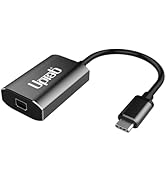
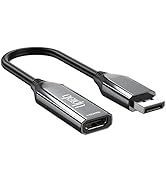
The UPTab USB-C to Mini DisplayPort Adapter delivers flawless 4K@60Hz video and audio output from USB-C Thunderbolt 3 devices to Mini DisplayPort displays. Featuring pass-through USB-C Power Delivery, it keeps your MacBook or iPad charged while connected. Compatible with the latest M4 MacBook Pro/Air, iPad Pro, Mac mini M4, and more, this plug-and-play adapter requires no drivers and ensures reliable performance with its built-in microprocessor. Perfect for professionals demanding crisp visuals and seamless connectivity.










| ASIN | B01N4FQNYW |
| Best Sellers Rank | #58 in USB-to-VGA Adapters #8,677 in Computer Cables & Interconnects |
| Customer Reviews | 4.6 4.6 out of 5 stars (919) |
| Date First Available | December 19, 2016 |
| Is Discontinued By Manufacturer | No |
| Item Weight | 1.58 ounces |
| Item model number | UP-USBC1009 |
| Manufacturer | UPTab |
| Product Dimensions | 6 x 1.25 x 0.25 inches |
B**Y
Plug and play
This little thing works as advertised. I’m using it to connect a newer MacBook Pro to an Apple Cinema Display. After many tries of different products that did not work, this one does. Some are noting that the dongle heats up? I’m not experiencing this, mine does not seem to rise above room temperature, even if on all day. But I’m also not using the power pass-thru, which I know will cause resistance issues and waste heat. Overall, works as advertised.
R**7
Worked great to connect MDP Apple cinema display!
After purchasing, I used this item to connect a 2010 Apple Cinema display with a Mini Displayport connector to a Thunderbolt-4 connector on a 2024 Mac mini M4. It worked perfectly, without a glitch. The monitor appears to have full capabilities, after also connecting the monitor’s USB type-A connector to an ancillary dock on the same Mac. That last action enables the camera and the ability to have adjustable audio output from the monitor’s speakers.
J**.
Works great
Fast shipping fixed the issue with my monitor flashing.
D**N
Great adapter for Mac Mini M4 to Cinema Display - DisplayPort
Great adapter and works perfectly connecting Mac Mini M4 to older Cinema Display with display port connection
N**N
Adapter works for Apple Cinema Display with USB Type C Connection
After purchasing a new MacBook Air with USB Type C ports, I was concerned about using my older Cinema display as an extended monitor. After searching around, I came across this adapter that works great for charging my MacBook Air while also using the extended monitor Cinema Display via the USB Type C connection. So far, I have not had any issues with the adapter. The only "ding" is the way that the charging cable plugs into the adapter. It is a slight design flaw and would've been better if both the mini display port and charging port were on the same end. A recommend buy if you do not want to purchase another extended display.
J**E
Finding the right display port adapter to connect my Apple monitor to a new Mac
Upab has amazing technical support via the Chat function. I ordered an adapter to connect a display port from my monitor to a new Mac since the Mac didn't have a display port like the old one had. I couldn't make the connection work with several different adapters that I ordered. I was with the Chat tech off and on for an hour and still couldn't get the monitor to display with the Upab adapter. Finally the tech offered to talk with me on the phone to figure this out and gave me his number. When I told him how I was connecting the adapter to a bridge to the Mac, he stopped and said that wouldn't work because the bridge couldn't handle the signal. So I connected the adapter to the Mac which I thought wouldn't fit. Needless to say, this saved me hours more work since I wouldn't have thought the issue was the bridge. Thanks Upab !!!
N**R
Perfect for my Mac mini M4 and 12 year-old apple cinema display
I have a 12 year-old Apple cinema display and needed a way to connect it to my new Mac mini M4. This did the job perfectly. Be aware, you do need to plug the USB cable from the monitor into the USB port on front of your Mac mini. This will require a standard USB a to USB-C adapter. That said it works perfectly.
D**N
Works with Apple screen
Exactly what I needed to hook up my old but wonderful Apple screen to my new Macbook Air. Apparently needs to use one of the USB-C ports on the Macbook rather than a USB-C port on a peripheral device.
H**A
Après avoir tester plusieurs adapteurs, celui-ci est le seul qui fonctionne pour moi pour relier mon vieux moniteur apple avec un macbook pro nouvelle génération (2024). Pas de scintillement ou de saut d'images. On verra à l'usage.
M**M
I went through four different adapters before I settled on this. And it worked straight away, at full resolution without me having to do anything. I have a Mac mini 2018 and an Apple 30" Cinema Display - the hardest thing was getting the two to connect together. I first went for the cheapest which failed, sent it back, ordered something more expensive which also failed and so on until this - this just worked. I didn't even have to connect an extra cable to the spare USB-C slot on the adapter. I highly recommend this.
R**D
I wondered if I’d be able to keep my old Apple 30” Cinema Display when I got an M1 Macbook Pro. Tried a couple of adapters and this one works. Very happy.
D**Z
Funciona perfecto para conectar un Apple Cinema de 23 pulgadas a un iMac 2019. Compre un par de marcas distintas y no funcionaron. Este funciona perfecto.
T**V
It worked ot of the box, interfacing mini display port flying lead to a USB-C port on my 2020 Apple Mini M1 running under Ventura 13.4. I use for video only display on the the Apple LED Cinema Display and output sound elsewhere. There are no visible artifacts using the default 2560x1440 resolution and the computer's Displays setting automatically defaulted 'Colour Profile' to 'LED Cinema Display'.
Trustpilot
1 day ago
1 month ago