We remain fully operational. Our teams are working around the clock to ensure your deliveries continue safely.

DOWNLOAD THE APP


Customer Services
Copyright © 2025 Desertcart Holdings Limited
DOWNLOAD THE APP


🎮 Light up your game with speed and style!
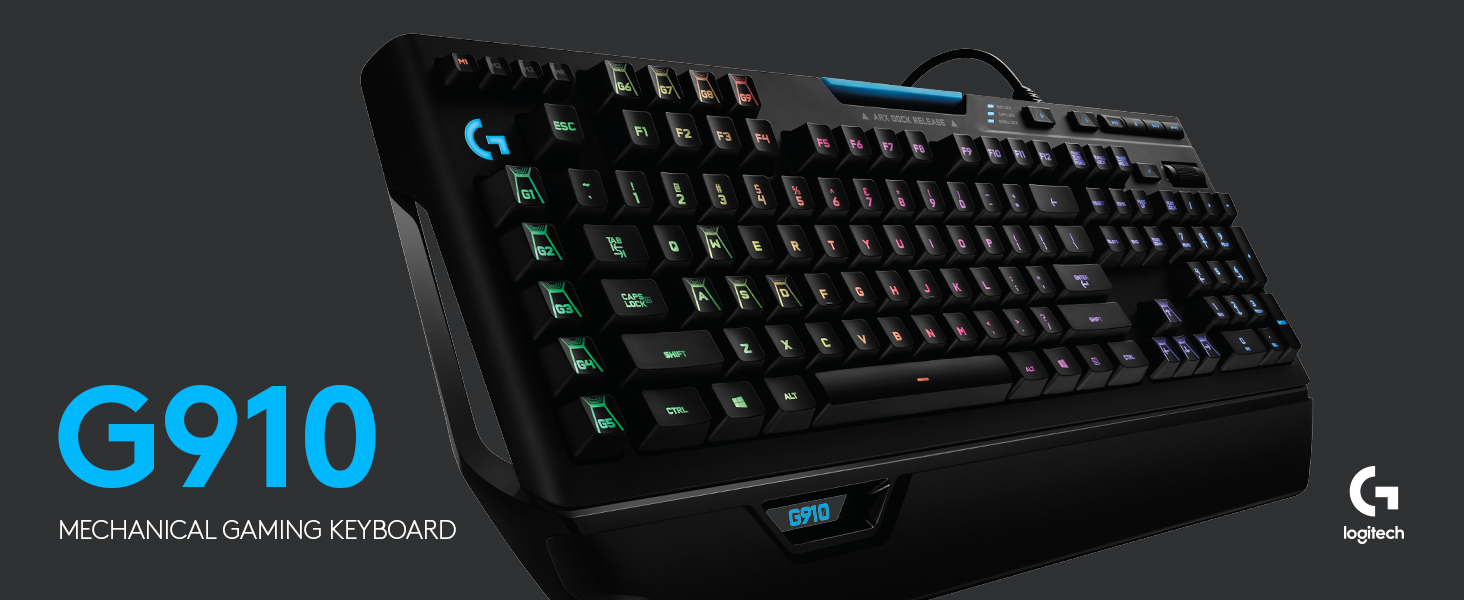
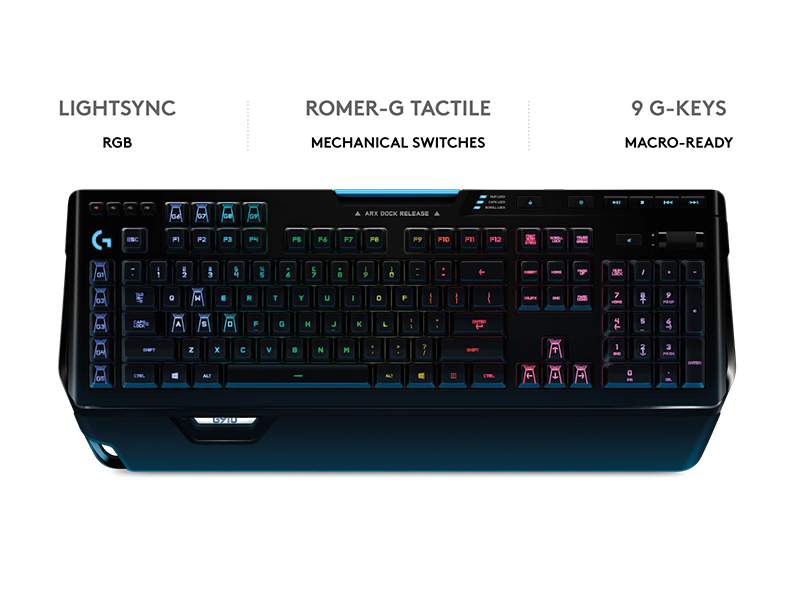
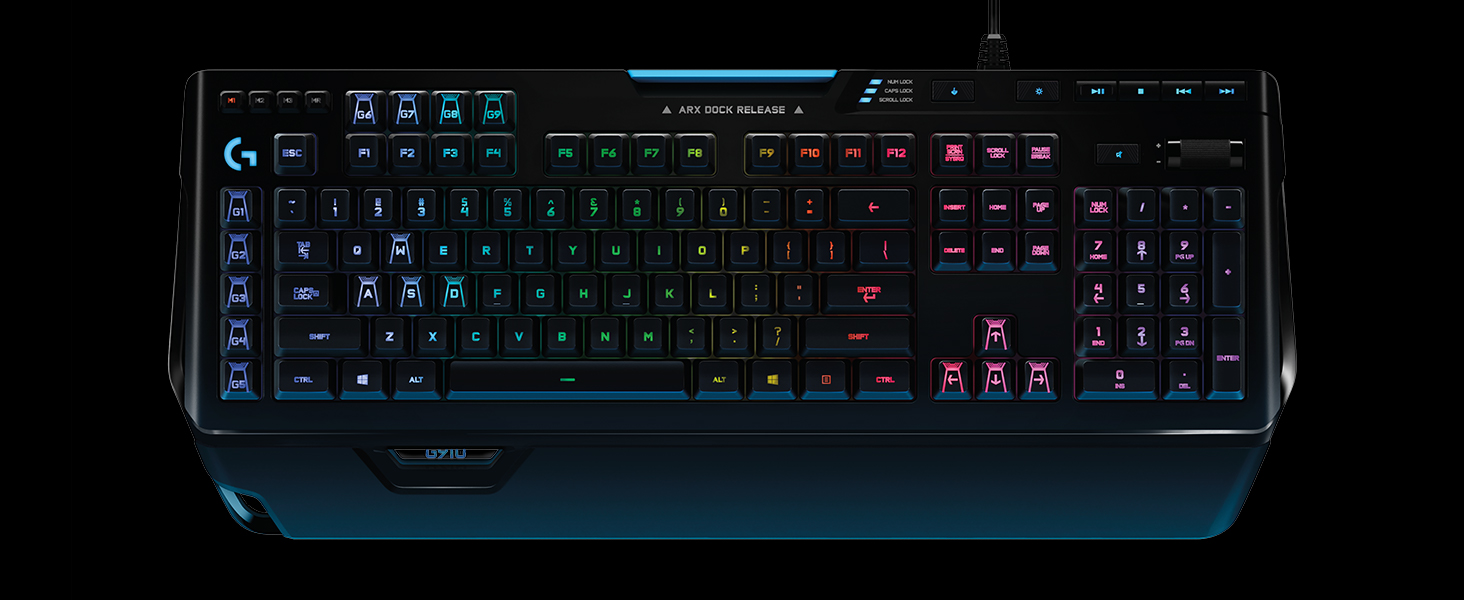
The Logitech G910 Orion Spectrum is a premium mechanical gaming keyboard featuring ultra-responsive Romer-G switches that deliver 25% faster actuation. It boasts fully customizable RGB backlit keys with 16.8 million colors, 9 programmable G-keys for instant macro execution, and Arx Control technology for real-time mobile updates. Designed for serious gamers seeking precision, speed, and immersive lighting, it integrates seamlessly with Logitech's gaming software for personalized performance.
| ASIN | B01G5Y27VY |
| Antenna Location | Gaming |
| Best Sellers Rank | 15,671 in PC & Video Games ( See Top 100 in PC & Video Games ) 594 in PC Gaming Keyboards |
| Box Contents | Mouse |
| Brand | Logitech G |
| Brand Name | Logitech G |
| Button Quantity | 9 |
| Colour | Black |
| Compatible Devices | PC/server |
| Compatible devices | PC/server |
| Connectivity Technology | USB^Wired |
| Connectivity technology | USB^Wired |
| Customer Reviews | 4.4 out of 5 stars 10,235 Reviews |
| Enclosure Material | Plastic |
| Global Trade Identification Number | 05099206064287 |
| Hand Orientation | Ambidextrous |
| Item Dimensions L x W x H | 21L x 50.5W x 3.6H centimetres |
| Item Weight | 1500 Grams |
| Keyboard Backlighting Color Support | RGB |
| Keyboard Description | Gaming |
| Keyboard Layout | QWERTY |
| Keyboard description | Gaming |
| Manufacturer | Logitech |
| Model Name | G910 Orion Spectrum |
| Model Number | 920-008017 |
| Number of Keys | 9 |
| Number of Sections | 2 |
| Power Source | Corded Electric |
| Product Features | Backlight^Backlight type^Full-size keyboard^LED indicators^Numeric keypad^Windows keys^Wrist rest^Yes |
| Recommended uses for product | Gaming |
| Special feature | Backlight^Backlight type^Full-size keyboard^LED indicators^Numeric keypad^Windows keys^Wrist rest^Yes Special feature Backlight^Backlight type^Full-size keyboard^LED indicators^Numeric keypad^Windows keys^Wrist rest^Yes See more |
| Style Name | UK Layout |
| Switch Type | Romer-G Mechanical |
| Theme | Rainbow |
J**O
Fantastic all-rounder without compromise
Having gone through many keyboards in recent years, trying to find my the best all round keyboard for me, this is the one that I would hands down recommend as the best all around mechanical keyboard - the only caveat being the switches and personal tastes in this area. My favourite characteristics are: -Dedicated media keys and scroll wheel volume control -9 macro keys -3 profiles for the macros -Stable customisation software compared to the competition -Comfortable keycaps for typing on and clearly marked -Built like a complete tank -Phone dock (use this all the time!!!) A flaw in many of the competing products at the moment I feel is the amount of effort being put into making it a 'gaming' keyboard, or a 'professional' keyboard. The ASUS ROG Claymore looks like it is being built to military spec to take into war, and it and other similar boards use fonts that look like they have just come out of the latest Sci Fi series on Netflix or something. I personally hate having to rely on a Fn modifier key to enable me to change the volume of my computer with my keyboard, or play and pause songs, so Ducky is out of the question. Though Das Keyboard has a keyboard with a sensible aesthetic that could be fit for the workplace and at home, whilst maintaining most of the media functions that I look for, it is lacking the macro area that is seemingly only found on a 'gaming' board. Customisability of the keyboard interface, be that colours or key functions, is easily achieved with the Logitech G software, with it being stable on both my Windows and macOS computers, something that I have had problems with in the past with Corsair and Razer. I switch between playing games occasionally, typing out long segments of text, and doing CAD work, and having the ability to add a macro in for a specific command line in AutoCAD that is either easily forgettable, or buried within other commands is great. This macro key then pro-actively switching over to sending out a specific ping in Battlefield or League is then very useful. For on the fly customisation, or where you are using a computer that you are unable to install the software on, at work for example, the macro record function and the in built memory mean that you are still able to change the functions of the G keys as and when desired, without being locked into a software suite. It isn't perfect - the switches are not quite as 'magical' as Cherry Blues for example, though I prefer them to Browns, and the aesthetic is still undeniably more 'gamer' like than the Ducky or Das alternatives. But these are small points - the switches are still a total joy to use, Blues are fun sounding and feeling, hence why I like to type on them, but the Romer switch is quieter and almost as tactile, with minimal travel distance, making it a better suited switch for the workplace if you are in an office with other people around. The lights can be turned off as well, leaving you with a board that is larger than conventional boards through all the extra functionality and buttons on the panel, but without looking out of place as much as ASUS or Corsair alternatives might. If you can look past these subjective weaknesses, and want something with all the functions with little compromise, this is definitely worth a look at!
H**E
Excellent for gaming and perfect for typing!
Only had this keyboard for a day; I love it! Never have I been so eager to write a review. I purchased this keyboard to replace my Logitech G510 that had ceased to work after 2 years (surprised it lasted that long after the multitude of spillages it was subjected to). The other few brands of keyboards I have tried before this one always disappointed me, often not to the fault of the keyboard but to them not suiting my own preferences. Regardless of how well built, designed and usable a keyboard is - if it doesn't appeal to the way in which you want it to perform under your hands then it will only be a regrettable purchase. This keyboard has excellent mechanical keys that produce the smooth 'clickety-clack' sound you would expect without being too loud, they are soft to the touch and won't tire your fingers. The ability to customize the keyboard is what sold it to me. I spent a fair bit of time finding the right colours to match those of my computer and mouse. Of course, I couldn't justify buying a high-end keyboard like this one for general use. The fast response times and flashy design make it ideal for gaming but I suppose it would also be well suited for typing enthusiasts or anyone who wants to show off. The optional lighting and effects are good for touch typists but would likely cause issues for anyone who looks down at the keys as they type (although with a colour that is easy on the eyes this shouldn't be an issue). The macro keys are conveniently placed out the way and don't look messy like they did with the G510, if you take the time to add some actions to them with the software they can serve to be very useful. Finally, the volume control, pause/play and skip options are a treat for anyone listening to music in the background whilst gaming. Makes it simple and easy to skip songs you're not in the mood for, edit the volume or stop the music completely (important for those intense moments) without having to tab out the game and potentially break the immersion. Excellent for gaming and perfect for extended typing sessions. Definitely recommended!
T**Y
Brilliant keyboard but it's not perfect with a few annoyances
Having used a Corsair K70 RGB Cherry MX Red for the last 3 years I decided that it was time to buy a new keyboard. It actually took me quite a long time to get used to the K70 simply because the Cherry Reds didn't seem the best for typing on and I initially made way more typing errors than normal. The main reason for me deciding to get a new keyboard was due to how loud the Corsair K70 with Cherry Red switches were, especially when bottoming out. This was very noticeable late at night if I was working and it really was difficult to type quietly on that keyboard. I decided that I still wanted a mechanical keyboard but needed something quieter if possible. Mechanical keyboard? Quieter? Yeah... definitely not 2 words normally found in the same sentence although Logitech's Romer-G switches kept cropping up as being much quieter than Cherry switches. Logitech had a few gaming keyboards to choose from that had Romer-G switches but I really liked the multimedia controls on the K70 and used the volume control a lot so I really wanted that functionality again. That pretty much narrowed it down to just the G910. I read up a bit and the G910 Orion Spectrum keyboard received generally favourable reviews with most of the criticisms being related to the feel of the Romer-G switches compared to Cherry switches. I think if you are used to Cherry switches then the Romer-G switches are going to be a drastic change and some people simply won't like them. I wanted to see how different they are and decided to buy the G910 Orion Spectrum and managed to get it for a good price too. On arrival I was a little disappointed with the product packaging. The photo of the keyboard on the outer sleeve looked like it had been printed on an inkjet printer with blocked nozzles and was printed on paper thin card! Not a great start for a keyboard with an RRP of £159.99. The box was relatively heavy though which suggests the keyboard itself might be sturdy. Not much else in the box other than the keyboard and a small instruction and warranty pamphlet. The keyboard is quite heavy and feels sturdy. It is entirely plastic construction on the outside though, unlike the K70 which had a brushed aluminium body and felt considerably more premium. The cable is not braided - not a deal breaker but all my other Logitech products have braided cables and for the sake of a few pence it seems a little mean to leave this off a flagship product. There is no USB pass-through on this keyboard - I only mention it because my K70 did have this feature but then again it consumed an additional USB port on my PC. On the plus side the cable is quite thin and should be easy to route. After plugging the keyboard in I booted up my PC. The keyboard's RGB lighting sprung into life, cycling through the colours of the rainbow from left to right. Very pretty, I guess, but definitely not very subtle! Also an unusual choice for default lighting I would have preferred a static colour especially as this cannot be changed without the Logitech Gaming Software running. There is a button to turn the lights off altogether but then the keys are quite hard to make out in low light. After Windows booted the keyboard was detected automatically by the Logitech Gaming Software, which I already had installed. I did not need to install any additional drivers for Windows 10. As for typing on, while I agree they do feel quite different to the Cherry MX Reds I was used to, I personally prefer the Romer-G switches. They are certainly a lot quieter than the Cherry Reds and I find them much easier to type on. I don't think they feel as smooth to actuate as the Cherry keys but after a few days of using them I really like them now. The keyboard has no on-board memory so it cannot store profiles for your G-key configuration or your RGB lightning. This means it requires the Logitech Gaming Software to run otherwise it's a basic keyboard with annoying default RGB lighting. If you are running an OS that doesn't have this software then you may struggle to get the most from this keyboard. There's plenty of configuration options for the RGB lighting and the latest Logitech Gaming Software allows to create some really cool custom stuff - you can also download profiles other people have made. Not all buttons on the keyboard can have their colour changed though. The 3 M-keys in the top left are orange, the MR-key in the top left is red and all of the media keys and Caps lock/Scroll lock/Num lock lights in the top right are blue. The RGB LEDs have a blueish hue to them so it's not possible to make a pure white colour. The light does not bleed from underneath the keys like on the K70 and I think it looks cleaner as a result. I had a play around with the 'G' key profile stuff which seems quite cool and would be really beneficial in MMO games and other applications where macros would be useful. I'm not playing any games that would benefit from them at the moment so I probably won't use those keys just yet. It wasn't a selling point for me anyway. One thing that really annoyed me and needed changing was the 'G5' key in the bottom left, next to CTRL, was mapped to F5. I accidentally hit it more than once and it refreshed my browser window when I didn't want it to. Thankfully it was easy to remove the assignment in the Logitech Gaming Software. I love still having a thumb roller for the volume control although it doesn't feel anywhere near as nice as the one on my Corsair K70. If I tap it it rattles a little too so I hope that doesn't cause issues further down the road. The ARX Dock Release is simply awful and very poorly executed too. It's basically a cheap light blue plastic wobbly tray that's completely different colour to the rest of the keyboard and also has no charging capability for your mobile. The idea is that you sit your mobile phone in it whilst running the Logitech ARX Control app to get different stats during games etc. but I don't this isn't going to be good for your battery or screen on your mobile phone. It would have been best left off the keyboard altogether instead of it being one of their main selling points! Just to clarify something that confused me initially was multiple versions of the G910. The G910 Orion Spectrum is a revised version of the G910 Orion Spark. The Orion spark has odd shaped keys and quite an ugly looking wrist wrest. I don't think some of these were well received by the community but it does look like Logitech listened to their users and made some changes to the G910. Overall I really like this keyboard but it is let down but a few things. At this price point this should be the perfect keyboard but it's not. Hopefully Logitech's next flagship gaming keyboard will be closer to perfection. Pros: - Very heavy and sturdy despite being made of plastic - Romer-G Tactile switches are nice to type on (I much prefer them to Cherry MX Reds now) - Romer-G switches seem considerably more quiet than Cherry MX Reds, even when bottoming out - 9 programmable G-keys which when combined with the M-keys provides 27 unique functions (Logitech Gaming Software required) - Thumb roller volume control which is much nicer than pressing + and - buttons. It's not as nice as the Corsair K70 one though. - RGB lighting is very flexible (Logitech Gaming Software required) - RGB lighting doesn't bleed out from the under the keys like on some other keyboards such as the Corsair K70 RGB Neutral: - USB cable is not braided - No USB pass through on the keyboard - I would have preferred the W,S,A and D keys to have standard looking caps on them with the 'G' caps supplied as extras Cons: - No on-board memory to store profiles so the Logitech Gaming Software has to be running at all times otherwise the G-keys and RGB lighting settings do not work - Without the Logitech Gaming Software the RGB lighting defaults to an aggressive rainbow effect. You can turn the lighting off completely with one of the buttons but then the keys are really hard to see in low light. - Non-RGB LEDs for the Media keys (blue), M-keys (orange) and MR-key (red). - The ARX Dock Release is simply awful!
B**T
Excellent
I spend a lot of time using a keyboard so I'm very fussy about them. I saw this one reduced so I decided to try it. I was previously using a good mechanical keyboard that used Cherry switches, which I was happy with, so I bought this one with one eye on returning it. I'm keeping it. The appeal of this keyboard was the dedicated media keys (especially the volume roller) and the macro (G1-G9) keys that I could program. They're great. The keyboard is sturdy with a re-assuring weight to it. It's not huge, as some people have commented. It's only slightly bigger than the one it replaced so it won't consume too much desk space. They key action is great. Not quite as clicky (or noisy) as my Cherry keys but still satisfying clicky and has a very obvious mechanical feel. I've heard others say it has a membrane feel to it. It doesn't. The keyboard really has everything you'd want from a keyboard. Nice keys, great feel, great lighting, lots of dedicated keys, comfortable to use. There are 27 macro keys (9 unique ones that you can customise in three ways) so you can program all of your common keystrokes and phrases. Recording macros is very easy. It's a real time saver. There's a quality feel to every key that I can't put into words but you'll know it when you feel it. I'm a casual gamer. The RGB is nice and, as others have noted, very bright, much brighter than my old keyboard. The gaming keys (WASD) are clearly highlighted. The macro (G) keys will be great for gaming (I've not tried them yet). The Arx Dock Release doesn't do much but at least it's somewhere to put your phone while you work/play. I'll use it in spite of it being nothing more than a phone holder. Overall, I'm delighted with this keyboard. I genuinely bought it with the possibility of returning it but it's a keeper. Would I pay £160 for it? No -- although I was keeping my eye on a similar Corsair (RGB Pro) one for around that price (it also has the media keys that I wanted). But if it's on sale for £100 or less I'd 100% recommend it. Even if you have a good keyboard, this is better.
R**T
This is an amazing keyboard!
I've actually had this keyboard for quite a few years now but I ended up spilling cider all over my old one, though surprisingly I only lost a few keys functionality, unfortunately dead keys are not great on a keyboard no matter how many, so I just bought another one of these because it's just that perfect of a keyboard. This keyboard is a pleasure to use, it's got nice crisp mechanical keys which have lots of feedback but are not as "crunchy" as other mechanical keys, for lack of a better term. It's great for both gaming and just typing in general, with a nice amount of macro keys if you're into that, truth be told I've never used any of them myself but they work just fine. The brightness on the back lighting for this keyboard is also amazing and with Logitech's software you can make some really nice lighting schemes even if the software itself is a little bit clunky at the moment, hopefully they work on that. This keyboard also has lots of nice little things, such as a windows key lock (can also be configured to lock other buttons), a button to turn the lighting on and off, media control keys and a really nice volume slider which is just a little roller but it's so much nicer, more precise and tactile than volume up and down buttons. Furthermore this keyboard is nice and heavy, which is actually a big plus as it means it doesn't move around too much while you're using it especially in more intense gaming situations. Build quality-wise this keyboard is top-notch, it's got a lovely matte almost soft feel to the keys and the plastic, and although it is mostly plastic it doesn't feel cheap by any means, it also just looks really nice especially with a good lighting scheme set up. All in all, this is an expensive keyboard, and Logitech do a number of more stripped-down versions of it which I'm sure are just as good for their price-range, but if you want a good, solid and good-looking keyboard and you're willing to spend a bit of money to get one then I can't think of any better to recommend personally.
Z**O
Seems good value at the moment. Has a 'feel right' factor when typing. Infinite control over colours and illumination of keys.
After the logitech gaming software simple fix for 4k displays, I thought I'd plump for this keyboard, at under £100 it seems like good value, although I guess a newer version is on the horizon I'm not a hardcore gamer but a gaming enthusiast none the less. First impressions were a little bit disappointing as far as build quality, it is a plastic device so stability not on a par with some of the heavyweight keyboards out there but certainly more stable than most. In particular the volume control roller doesn't exude a feel of quality, being rather loose and free-wheeling... still, kudos for the fact it's on the keyboard in the first place, it is very useful. The hardwired usb cable doesn't appear to be of a particularly durable construction and neither is the palm rest. The roamer g keys are surprisingly easy to get used to, positive but not annoyingly loud... it's a keyboard that just feels right when typing. I'm not one for flashing led displays but I do like subtle illuminated colour coded keyboard sections, and this is where the G910 shines (sorry!). The logitech gaming software is fairly easy to use and I had quickly set up the specific keys to colours of my choice, often using my own custom colours at reduced brightness. I've seen reviews complaining about no brightness control for the illumination, and it's true there's not a single brightness control, but you can reduce brightness by adding black to the colour choice. The macro G keys proved an initial problem, but after following advice to reinstall the logitiech gaming software, they worked as advertised.
M**6
Great keyboard for software engineers. Virtually free of any issues with the provided software.
Great keyboard. I had to replace my old keyboard (also Logitech G600 or something like that) as I just wanted to. I was testing Corsair K95 RGB LED, (Cherry Brown MX) unfortunately LEDs start failing after just 3 days ! (I loved the sound of key hitting aluminium bottom, loved huge amount of programmable keys, lighting, hated failing LEDs and awful software that was constantly freezing (tested on 2 laptops and 1 workstation (Win 7 / Win 10)). This keyboard maybe doesn't offer a same feeling as superb Corsair K95, but it is much nicer than other membrane keyboard, offers good quality lights (not so bright as on K95 and not so many cool effects like on K95), has nice keys but what is the most important, the software is pretty much rock solid from all programmable keyboards (Logi is semi programmable as you can only program few programmable keyboards, most of their competitors can program and re-map all keys). Maybe once or twice a week I have to reset the Logitech software (I am working as software engineer so often leave workstation in sleep, most likely you wouldn't have the issues with the software once-twice a week if you would shutdown your PC), but pretty much I can work with it without a trouble (K95 had a constant issues and had to fight sometimes few times a day. When you'll working on software your time is too valuable to spend 10-15 minutes on software issues with your keyboard as you'll loose way more money than keyboard is worth in just few days). So if you are making money on your PC and you cannot afford to loose your money (time) on fighting with driver/software, need a good quality semi-mechanical keyboard, then this one will be perfect for you.
S**M
I like this keyboard but only lasted 4 years.
How long shold a keybooarard lastt? Iwas hoping to get more than 4 years ot of ths one to be honst, but as you can see it is no good anymorre. I will add more when my new kkeyboard comes as thiis one is douoble typing and missin gkeys like crazy and I can't brn myself to keep correctting it all as 'll be here all day. UPDATE: Ok so my new keyboard has come now so I can update this review (I went with a Corsair K70 RGB TKL If anyone is interested as I found the G910 to be quite on the large side and I don't do a lot of typing really, mostly just used for gaming, I can already tell it is going to take me a while to get used to the right 1/4 of the keyboard not being there but I rarely used it anyway.) So the logitech keyboard did serve me well for 4 years, but I just don't feel like that is a lot of time for what is quite an expensive keyboard and would've been happy with it for a few more years. My main gripes with it were that the volume dial thing on the top right felt very cheap and would move if you nudged the keyboard, and that it is awkward to clean, especially the light up G910 part at the bottom left. Lastly, the Logitech software is just awful, I would spend ages creating profiles, for them to just not work so I gave up and just left it on a default one. The keys are nice and responsive (when they work) and I like how it sounds, I just can't recommend the keyboard as an investment when it is likely that it won't last you more than 3 or 4 years. Logitech make great mice and headphones, it just seems they aren't quite there with the keyboards yet, shop around and go for another brand...
Trustpilot
1 month ago
3 weeks ago