
🚀 Upgrade your home network — fast, stable, and secure!
The TP-Link TL-WR841N is a high-performance wireless N router delivering up to 300Mbps speed, ideal for HD streaming, gaming, and VoIP. Equipped with dual antennas, it ensures robust and stable WiFi coverage even through concrete walls. Its one-touch WPS button enables quick WPA2 encryption for secure connections. With IP-based bandwidth control and easy setup via the TP-Link Tether app, it’s a reliable, budget-friendly solution for small offices and home networks.


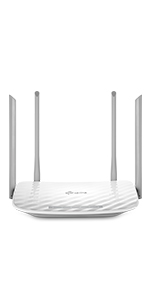
| ASIN | B001FWYGJS |
| Are Batteries Included | No |
| Best Sellers Rank | 473 in Computers & Accessories ( See Top 100 in Computers & Accessories ) 1 in Routers |
| Brand | TP-Link |
| Colour | White |
| Computer Memory Type | DDR3 SDRAM |
| Connectivity Type | Wi-Fi |
| Customer Reviews | 4.2 4.2 out of 5 stars (78,383) |
| Date First Available | 2 Oct. 2009 |
| Guaranteed software updates until | unknown |
| Item Weight | 250 g |
| Item model number | TL-WR841N |
| Manufacturer | TP-Link |
| Number of USB 2.0 Ports | 1 |
| Operating System | Yes |
| Processor Count | 1 |
| Product Dimensions | 11.68 x 17.53 x 3.3 cm; 249.98 g |
| Series | TL-WR841N |
| Wattage | 8 watts |
| Wireless Type | 802.11b, 802.11g, 802.11n |
M**R
Affordable and great!
I'd suffered and endured the dubious Virgin Media "Superhub" long enough. I decided I'd try a new router after reading all the similar problems on the Virgin Media forums. I didn't want to spend too much money, so reading the generally positive reviews of this router, and that others had even used it for the same reason, I went for it. Setting it up was incredibly simple, although I have had previous experience. But honestly the hardest part was probably setting the old VM box to "Modem" mode.. Anyway! Afterwards I wired in this new router, logged on to it wirelessly, went into its admin menu, clicked the automatic setup wizard and.... Bosh. Done! I didn't bother with the enclosed CD, I guess it would've installed unnecessary gunk on my PC, I have no idea what's on it. So setup took literally a couple of minutes, including untangling wires. Really easy. Performance has been fantastic. I immediately noticed a dramatic improvement over the old VM box. Before I'd have to click on a link on my wirelessly connected PC, and wait. Then perhaps click again. Same with all other devices. It was like the router just wasn't bothering to connect to the internet. Now it works properly. Ping and download speeds are epic. Before the ping could be pretty high, and download speeds could sometimes be fast, but somewhat variable and inconsistent. Now downloads are fast and rock steady. We have an xbox hooked up via wireless, in a bedroom the opposite end of the flat (It's a late 70s build with some pretty thick concrete walls to get through). It used to hover around the 1 bar of signal on the xbox "Find Wireless" section. Now it hovers around the Maximum point, occasionally dropping only by 1 bar. Playing games had gotten to the impossible point, and party chat was a stuttering mess of choppy voices and impossible to understand. Now, perfect. So signal is strong and very dependable. I stream media to a wireless radio, xbox etc. Worked perfectly out of the box. My wireless printer that had seemed very temperamental before is now fully co-operating. I read a couple of reviews where people said they had to reset... Mines been on permanently for a few weeks now without a single issue. I did ensure that I had the latest firmware on the TP-Link website, turns out it already had it installed. Maybe that helps? Anyway its behaved perfectly for me. So overall I rate this a fantastic router for my pretty basic needs. £20 for this is a bargain. It made my Virgin Media internet work how it was supposed to be. How Virgin who had such a fantastic reputation for speed could then couple that with such a poor piece of equipment is unbelievable. But this solves it. It's just a shame that I have to keep my stupid, large "Superhub" hooked up in modem mode alongside this great router. Buy it. It's great.
O**K
Very good router for the money
Review of "TP-Link WiFi 6 OneMesh Router, AX1500 Mbps Gigabit VPN Router, Dual-Core CPU Fibre Router, WPA3 Cybersecurity, Ideal for Gaming Xbox/PS4/Steam (Archer AX18)", bought for £44.99 (31% sale price): I just got this set up today. I am very IT literate and it was easy to configure, and even for a non-geek it would be easy to get it working. I am using it with Plusnet Fiber and I just needed to put my credentials into the PPPOE section and click connect to get it working. I get the full speed of my Fiber connection (300 down, 50 up) and I can get that speed on LAN and on my phone via WIFI, with my previous router I got half that speed on WIFI. Note for geeks - I normally use routers that I flash with DD-WRT, but sadly this isn't an option for this router due to the closed source Broadcom chipset. The web-UI isn't fantastic, but I was able to configure all the more clever stuff I do with DD-WRT on it. I wanted to setup a VLAN and it has something called IPTV/VLAN, but I couldn't get it working, am not sure if it is me or if it doersn't do what I expect it to. I was able to setup a guest mode that has WIFI network that you can isolate from the LAN so that does what I needed the VLAN for. The router is very light and the front of it is hanging a couple of inches u pin the air due to the weight of the cables at the back pulling on it. It has a nice feature that you can turn off the LED status lights on the front, something I normally have to block off with other routers to stop them being annoying. Overall very good router, especially for the money.
A**S
Good router for the money, would recommend.
Bought this so I can WiFi split and have 2.4Ghz and 5G separate as my BT hub was too basic and needed Alexa to connect to my existing equipment. It was easy to setup although I had to reset a couple of times as it wouldn’t let me back in after changing the SSID and passwords. But I got it going ok in the end and quite quickly. After looking up my BT login details and entering them it all connected ok and all is up and running as I wanted. It also has a guest option in addition to the usual SSID’s, this I like and missed from my previous router. All in all I’m happy! Would recommend for a cheap router, has all that is necessary and won’t break the bank.
N**G
Affordable approach for inconnectivity
Good bargain, works like a charm. My previous disastrous router originally provided by my ISP was too incompetent to reach out my working office at the other side of the house. Imagine the router is set up at the 2nd reception room, and my office is located in garage as extension. Indeed a bearing wall in between, distance: approximately 15 meters. So happy that the frustrating inconnectivity dragging my git image commands disappears. Signal strength: Not powerful as using an extender, now I usually can only get 2/3 signal transceiver icon on mobile screen. Set up: Quite simple, costing around 10 mins or so. Anyhow I’m still so glad that it’s sorted out the clumsy inconnectivy under a well affordable manner.
P**N
Allt fungerade som det skulle! Snabb frakt och bra produkt!
B**.
Installation facile. Fonctionne bien .
W**S
Top produit, marche bien dans un petit périmètre.
H**1
Este router neutro TP-Link TL-WR841N es perfecto para usarlo en casa. Dado el precio y el público al que va dirigido, tengo que decir que es un equipo inmejorable tanto en precio como en prestaciones. Mención especial al Wi-Fi, pues ofrece una señal inalámbrica de gran alcance. Pasando a analizar el firmware, diría que el que viene de origen ya ofrece muchísimas más opciones que cualquiera de los routers que ofrecen habitualmente las compañías de telecomunicaciones. Al parecer, para un uso más profesional, quizás este firmware se queda algo corto. Según he leído por internet este router cuenta con un hardware estupendo que de cierta manera queda un poco desaprovechado por el firmware que lleva instalado de origen. Así que podría llegar a considerarse casi obligatoria la instalación de alguna versión del famoso firmware de DD-WRT que es completamente compatible y amplia muchas de las posibilidades de este router. Pros: - Fácilmente configurable. - Señal inalámbrica de gran alcance. - Económico. Realmente es un precio de derribo. - Soporta OpenWRT y DDWRT. Ideal para aquellos a los que les gusta trastear. Contras: - No lleva ningún puerto USB, por lo que no podremos crear un NAS o compartir una impresora. - Tanto los cuatro puertos ethernet para LAN como el puerto WAN, son 10/100Mbps (son Fast Ethernet, no Gigabit Ethernet). La necesidad de comprar un router me vino dada a una serie de viajes que iba a realizar, en los que sabía que sólo iba a disponer de una sola toma de ethernet y que obviamente no iba a ser suficiente para cubrir mis necesidades de conectar más de un dispositivo (tanto por ethernet como por Wi-Fi). Valoré la adquisición de un router de viaje, sin embargo el sobrepeso y las mayores dimensiones de este frente a las diferentes opciones diseñadas exclusivamente para viaje, no me suponían mucha diferencia, ni en lo relativo a lo económico, ni a lo relativo a las prestaciones. Por ello, me decanté por un router completamente funcional como este, y que bajo mi criterio personal no supone unas dimensiones ni peso exagerados para llevar (obviamente depende de la naturaleza del viaje, que en mi caso era establecerme en varias residencias de estudiantiles).
R**L
Cumple su función , por el precio es muy bueno , mi módem sólo tiene salida ethernet pero con este TP-LINK puedo conectar muchos aparatos vía wifi y jala excelente, distribuye muy bien el internet aparte de que tiene más salidas para aparatos vía ethernet, llegó en tiempo y totalmente nuevo y en caja sellada, así que recomiendo ampliamente a el proveedor y a Amazon, tiene varias funciones como la de escoger que aparatos wifi (con la Mac de cada aparato) se conecten a internet y también puedo seleccionar que aparatos no quiero que se conecten a internet, además de que su configuración es sencilla, y se puede poner en español para configurarlo, hasta la fecha ya a más de un mes de usarlo funciona excelente. Por el precio la verdad estoy feliz de haberlo comprado, no es un repetidor hasta donde tengo entendido, como les comento, lo conecte vía ethernet para que mis aparatos que usan wifi puedan tener internet y recalcó que distribuye bastante bien el internet , aparte de que uno puede seleccionar la frecuencia a la que llegue el internet.
Trustpilot
1 month ago
1 month ago



