
DOWNLOAD THE APP


Customer Support

Desert Online General Trading LLC
Warehouse # 7, 4th Street, Umm Ramool, Dubai, 30183, Dubai
DOWNLOAD THE APP
Customer Support
Desert Online General Trading LLC
Warehouse # 7, 4th Street, Umm Ramool, Dubai, 30183, Dubai


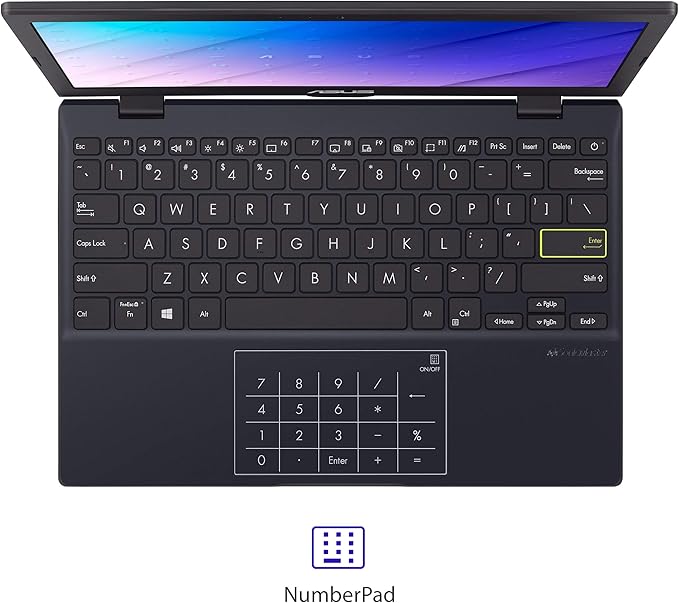

🚀 Elevate your mobile workspace with sleek power and productivity!
The ASUS Laptop L210 is a sleek, ultra-portable 11.6” notebook powered by an efficient Intel Celeron N4020 processor, 4GB RAM, and 64GB eMMC storage. It features a crisp HD display and runs Windows 10 Home in S Mode, bundled with one year of Office 365 Personal, making it an ideal choice for professionals seeking lightweight, reliable performance on the move.
| Brand | ASUS |
| Product Dimensions | 27.89 x 19.1 x 1.7 cm; 2.65 g |
| Batteries | 1 Lithium Ion batteries required. (included) |
| Item model number | L210MA-DB02 |
| Manufacturer | Asus |
| Series | ASUS Laptop L210 |
| Colour | Star Black |
| Form Factor | Notebook |
| Standing screen display size | 11.6 Inches |
| Screen Resolution | 1366 x 768 pixels |
| Resolution | 1366x768 Pixels |
| Processor Brand | Intel |
| Processor Type | Celeron N4020 |
| Processor Speed | 1.1, 2.8 GHz |
| Processor Count | 2 |
| RAM Size | 4 GB |
| Memory Technology | DDR4 |
| Computer Memory Type | DDR4 SDRAM |
| Maximum Memory Supported | 4 GB |
| Memory Clock Speed | 2.8 GHz |
| Hard Drive Size | 64 GB |
| Hard Disk Description | 64GB eMMC |
| Hard Drive Interface | USB |
| Audio Details | Headphones, Speakers |
| Speaker Description | Built-in |
| Graphics Coprocessor | Intel UHD Graphics 600 |
| Graphics Chipset Brand | Intel |
| Graphics Card Description | Integrated |
| Graphics RAM Type | DDR4 SDRAM |
| Graphics Card Ram Size | 4 GB |
| Graphics Card Interface | Integrated |
| Connectivity Type | Wi-Fi |
| Wireless Type | 802.11ac, Bluetooth |
| Number of USB 2.0 Ports | 1 |
| Number of HDMI Ports | 1 |
| Voltage | 19 Volts |
| Wattage | 33 watts |
| Optical Drive Type | No Drive |
| Power Source | Battery Powered |
| Operating System | Windows 10 Home |
| Are Batteries Included | Yes |
| Lithium Battery Energy Content | 1 Watt Hours |
| Lithium Battery Packaging | Batteries contained in equipment |
| Number Of Lithium Ion Cells | 2 |
| Item Weight | 2.65 g |
| Guaranteed software updates until | unknown |
R**A
Das Ladegerät von Asus hat keinen Adapter zum Einstecken in die Steckdose. Ich finde zugleich unprofessionell und unhöflich. Ebenfalls dauerte die Lieferung lange.
O**A
Para uso escolar está excelente, muy buena
P**E
These small, inexpensive Windows laptops are disappearing. It looks like 95% of the market in this segment has been taken over by by Chromebooks. If you find Chromebooks even more obnoxious than Windows machines, read on. I don't want to travel around with a $600 laptop, so this cheaper, lightweight machine is perfect for traveling, and possibly getting stolen or lost. It was no trouble to disable "S" mode. Instructions are readily available on the internet. I disabled it on the first try. Some things I like: There are LED lights for both "power" and "caps lock." Though the keyboard is not lighted, the "enter" key is painted fluorescent green around the rim, which makes it easy to see in dim light. The response from the 128GB SSD is pretty snappy, and better than I expected. The screen is matte, which is good -- not glossy. The power supply is small, about the size of a standard cell phone charging block. It took about 30 minutes to get Windows 11 going the first time. On the first charge, I ran the laptop for about 3 hours straight, always doing something, and used about 35% of the charge. This looks more than adequate for the tasks I do. There was approximately 80GB of free space on the 128GB SSD, since Windows takes up a good chunk of it. That's still plenty, since you are unlikely to install any giant games. About the only downside I see is that it gets a little warmer than my previous laptop when doing a lot of work. Not hot - just warm. When it's idling or under low usage, it's nearly at room temperature. But the N4500 processor is about 3X faster, so this is not a factor to drop the score. The processor in this 2024 model is also significantly better than the one in the 2023 model. No problems encountered thus far. I am very pleased with this machine. UPDATE: After three days, I ran into a problem -- but it has to do with the dreadful Windows 11, not the ASUS laptop itself. The Windows version that came installed was two years out of date (V22H2). When I attempted to update, the update downloaded, but then failed to install, giving a message that Windows had reached the end of its service life. Attempting the update again gave no relief. In short, this is a problem with TPM 2.0 and Secure Boot. This was solved by referencing the excellent article by Konstantinos Tsoukalas. Just do an internet search for "Windows has reached the end of service but not updating." Another "problem" was that W11 was using 3.1GB of the 4GB on the machine when the machine was just sitting there idling. The CPU load was running at 20%. I used the REVO uninstaller to get rid of three-fourths of the Windows apps, and all of the ASUS bloatware (which was fairly minimal). This brought the idling memory usage down to 1.7GB and the CPU load down to 10%. Quite significant. Still very happy with the laptop, itself!
L**.
I bought this NEW laptop on 2 Dec 2025. However, Asus.com says this laptop warranty ends on 7 Sep 2025. The warranty period is 1yr. Thus, this laptop was registrated with Asus on 7 Dec 2024. I suspect this is a USED laptop been sold as NEW laptop. Anyone could help me with this issue?
C**N
Llegó antes del tiempo estipulado, el producto es lo que se anuncia, tal vez ponerle material de embalaje para que no se mueva mucho la caja pero todo bien!
Trustpilot
3 weeks ago
1 month ago