
DOWNLOAD THE APP


Customer Services
Copyright © 2025 Desertcart Holdings Limited
DOWNLOAD THE APP




💨 Stay cool, stay ahead — liquid cooling redefined for the discerning pro.
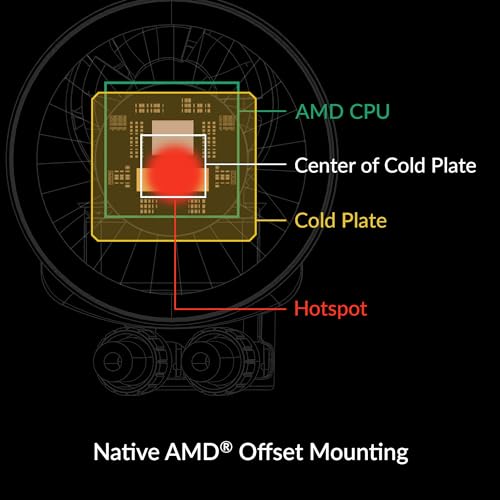
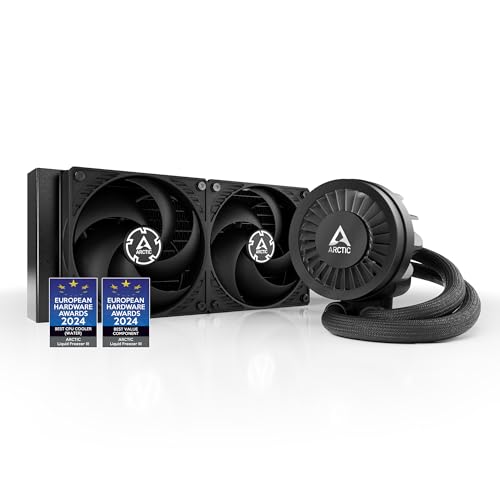
The ARCTIC Liquid Freezer III 280 is a high-performance all-in-one CPU water cooler featuring a 280mm radiator with dual fans, PWM-controlled pump and VRM fan for active voltage regulator cooling. Designed for Intel LGA1851, LGA1700 and AMD AM4/AM5 sockets, it offers optimized contact pressure and native offset mounting for Ryzen chiplets. Integrated cable management and whisper-quiet fan speeds make it ideal for professional-grade builds demanding efficient thermal management and sleek aesthetics.


| ASIN | B09VGXMTK4 |
| Air Flow Capacity | 72.8 Cubic Feet Per Minute |
| Best Sellers Rank | #33 in Water Cooling Systems |
| Brand | ARCTIC |
| Compatible Devices | 1851, 1700; AMD, AM5, AM4, Intel |
| Cooling Method | Water |
| Date First Available | October 18, 2023 |
| Global Trade Identification Number | 04895213704472 |
| Item Weight | 3.76 pounds |
| Item model number | ACFRE00135A |
| Manufacturer | ARCTIC |
| Material | Aluminium (Radiator), Copper, Micro Skived Fins (Cold Plate) |
| Maximum Rotational Speed | 1700 RPM |
| Number of Items | 1 |
| Power Connector Type | 4-Pin |
| Product Dimensions | 12.48"L x 5.51"W x 2.56"H |
| UPC | 840033402248 |
| Voltage | 12 Volts |
| Wattage | 1.44 watts |
T**R
Excellent AIO for high TDP CPU's - if you can get it to fit
Upgraded system from Ryzen 5900X to 9900X. I don't overclock or game much, but 9900X set for higher TDP in BIOS. Initially reused old 240mm AIO (Corsair H100i Pro). Idle temp was ~50 C and 95+ C under heavy video editing with some throttling - needed to upgrade AIO too. Pros: Fantastic price of $86 can't be beat. Same system with 280mm Arctic idles in high 30's C and only hits mid-high 70's C under same load. That's 20C cooler under load! and no throttling. Supplied fans cool fantastically, yet can barely be heard under full load (1650 rpm) The Arctic components are impressively built. All parts HD and well finished. The AMD mounting was easy to install. Out of box everything setup for top of case install - nothing to change. Minor Cons: No install documentation provided - Web only and cannot be downloaded - had to view on another device during install. My case was "approved" (Corsair 4000D Airflow), but everything was very tight. Fan wires and memory modules inaccessible after radiator in place. Hoses are stiff - had to restrain with big tie wrap to allow case door to be put back. Pump speed reporting whacky - out of box showed 4000-4800 rpm? Had to dial-in a 0.6 adj factor to get readings to 2800 max. If it will fit, highly recommend this AIO for hot CPUs
D**N
Works well with ProArt X870E with modifications to the M2 NVME quick release heat sink
3-07-25. A Asus ProArt x870E MB went into a Sliverstome RM46-502-I 4U case, with AMD 9950X3D CPU and Asus 5070TI OC GPU. Install and configuration instructions were minimal, with no documentation on POST issues or BIOS settings for UEFI Win 11 Pro install on NVME. Internet was no help with too many variations between MFG. MB Bios was at ver. 1203, so I had to scale back install to single RAM stick, 2TB Samsung Pro 990 NVME and hoped system stayed stable until chipset drivers could be loaded. Once loaded got caught in endless reboot loop with windows install wiped out until after Wifi chipset driver installed, then Windows update took over and system became stable enough to complete chipset. Drivers install to create a stabile system. About 24 hours to get the OS stabilized. As a followup after a few weeks of use, the required low profile CPU cooler, Noctua NH-D12L chromax.black was one of the few that allowed proper 4U case clearance and air flow through case. CPU Heat pipe stubs clear case cover by 4mm. Single 120mm CPU fan and at 1200 rpm, CPU at 95C with 30 CPU threads enabled, 10% overclock and 96% utilization during an hourlong 15000 x 12500 rendering run was woefully inadequate. With these high temps using only CPU to render, an AIO will be the better choice (cost is about the same as air CPU cooler) but max width and height for rear case radiator is 333mm x 140mm. An Artic Freezer III 280 fits the case and can dissipate up to 230W according to documentation. A 360mm radiator would will not fit the case, a 240mm does not have the heat dissipation capacity. Using RTX5070Ti 16GB OC 10% with 99% utilization on GPU 58C GPU temp , CPU remained at 76C with 10% utilization during same rendering run using open CL with the GPU only render taking about 10 minutes longer to render same image. An update 4-11-25: the Arctic Liquid Freezer III 280 was purchased and installed and found that the CPU block interfered with the ProArt M2 NVME quick release heat sink block. A 0.750"x0.5" x 1.25" chunk was machined from the NVME heat sink to allow M2 quick release to clear and snap into place. The same hour long 15000 x 12500 rendering run was used, CPU at 78C max with 30 CPU threads enabled, 10% overclock and 96% utilization with max 175W reported by Amour Crate during an hourlong rendering using only the CPU. Asus tech support was made aware of the NVME heatsink interference with a 3rd party AIO cooler. Suggested fix: Since the M2 quick release is near the GPU, there is enough clearance to remove the material along the complete length of the heatsink and add material to remaining heat sink to regain original heatsink disspation. Seems ready for Blender
J**I
Thicc boi
This unit is silent and keeps my 9800x3d under 60c while gaming. Reaches above 70c when stress testing. Water block can be a little difficult to install you just have to screw in each side little by little.
A**.
Quality product and good price
PROS: Quality build, cheap price, fans preinstalled CONS: Installation I want to comment on the installation because it’s a hot topic with this air cooler. the hardest part is easily installing the cooler to the bracket if you are using the AMD bracket (apparently instal for intel is much easier). The amd bracket is in dire need of a redesign. I watched multiple videos and read the manual on installation. Ultimately it only took me about two minutes to screw the cooler onto the cpu, so I really can’t complain too much. It requires a bit of force as well as keeping the unit aligned to the brackets, it’s a pretty counter intuitive process but thankfully I was well researched on the process and I didn’t struggle too much. Honestly all the bad reviews on installation made me worry more than needed. Take your time and watch guides on how to do it. Everything else about the installation is good though. My biggest piece of advice for installation if you’re going to buy this is install the pump to the cpu BEFORE putting the mobo in the case. This way you can easily align the pump to the bracket. Second piece of advice is you’re going to have to use more force to push it down than you would like to, it’s okay, you’re not going to hurt the cpu. Then screw the radiator in to your desired location.
B**Y
SFX or ITX builds be wary..... Otherwise great.
Arctic always has great aio's for a decent price but anyone using these in an itx case or have space constraints should really do your homework before buying. The issue comes with their rotatable 90's coming out of the pump/block. They do not rotate 360° and that causes issues with the hoses sticking out farther than the actually pump itself and of course you won't be able to close your case on a sfx build. They really only rotate about 180°, not sure why they designed it this way bc other models can twist all the way. We all know an extra half inch or so on a sfx build means the world in those builds. But performance is great especially for a 280mm.
N**S
The weird tension plate and no software is why it's so affordable
AM4 mount appears terrifying and wrong, but isn't, and is documented in the images for this cooler. An absolute unit that needs no third party software, installs easily, and performs better than the NZXT Kraken 360/Z73.
M**E
Amazing AIO
Used 3 of these so far for my PC, brothers and nephews all running great with good temps on our X3D CPUs
A**N
jag kunde inte få den in i mitt chassi där finns plats för 2x140 mm fläktar. passar alltså förmodligen något större chassi än zalman i3 neo
D**R
Big fan of this product, easy to install comes with good cooling paste. The radiator is really fat, this ofcourse is great for heat dissapation but it barely fit in the the front of my case. This is one thing to measure before buying. 5 out of 5.
Z**S
Performance delivered, like a boss
M**N
I upgraded my PC with a faster processor and the result ran a bit warmer than I liked with the stock AMD cooler. I'm not a hard-core overclocker and a mid-range air cooler would probably have been enough to get it under control, but I didn't like the idea of hanging a lump weighing over a kilo off a vertically mounted motherboard. So I decided to give an AIO a try. The PC is a work machine and I didn't want it lighting up like a Christmas tree. The processor is an AMD Ryzen7 5700G, so nothing too demanding on the cooling. The ARCTIC Liquid Freezer III 280 was listed as a good match to the Corsair 4000D case that I had chosen, so I ordered one. This was my first experience of water cooling and I was a little concerned that it might be difficult to install, but the Liquid Freezer was very easy. Even allowing a couple of stops to view the instructions, I removed the stock cooler and installed the Arctic in little more than half an hour - an experienced builder would do it faster. The results, for me, have been impressive. On the stock AMD cooler, the processor was idling at more than 50C and under load could easily touch 75C. With the ARCTIC Liquid Freezer III 280, it is idling below 30C and I have to push it hard to get it to touch 60C. I have not got the fans tuned yet and the noise levels at idle are slightly higher than the previous cooling based around the AMD stock cooler. But the stock cooler would do an impression of a jet aircraft taking off when the processor was under load - I've not noticed any noise increase between idle and full load with the Arctic installed. Customer service has been even more impressive... The cooler ships with two different cables - one to combine all the fans and the pump onto a single motherboard socket and one to connect them separately. I initially installed with the combining cable but subsequently decided that I wanted individual control. Trouble was that I had lost the necessary cable. I contacted Arctic support to ask if I could buy a replacement, but they simply asked for my address and proof of purchase, then popped a replacement into the post for me free of charge! That is service!
J**N
Hands down the best cooler I've ever had. Currently running it with a Ryzen 5850X and temps are maxing out at around 60-65 under full load. I do a lot of video editing and production work (as well as gaming) and have yet to experience anything even close to overheating.
Trustpilot
2 days ago
3 weeks ago