We remain fully operational. Our teams are working around the clock to ensure your deliveries continue safely.

DOWNLOAD THE APP


Customer Services
Copyright © 2025 Desertcart Holdings Limited
DOWNLOAD THE APP
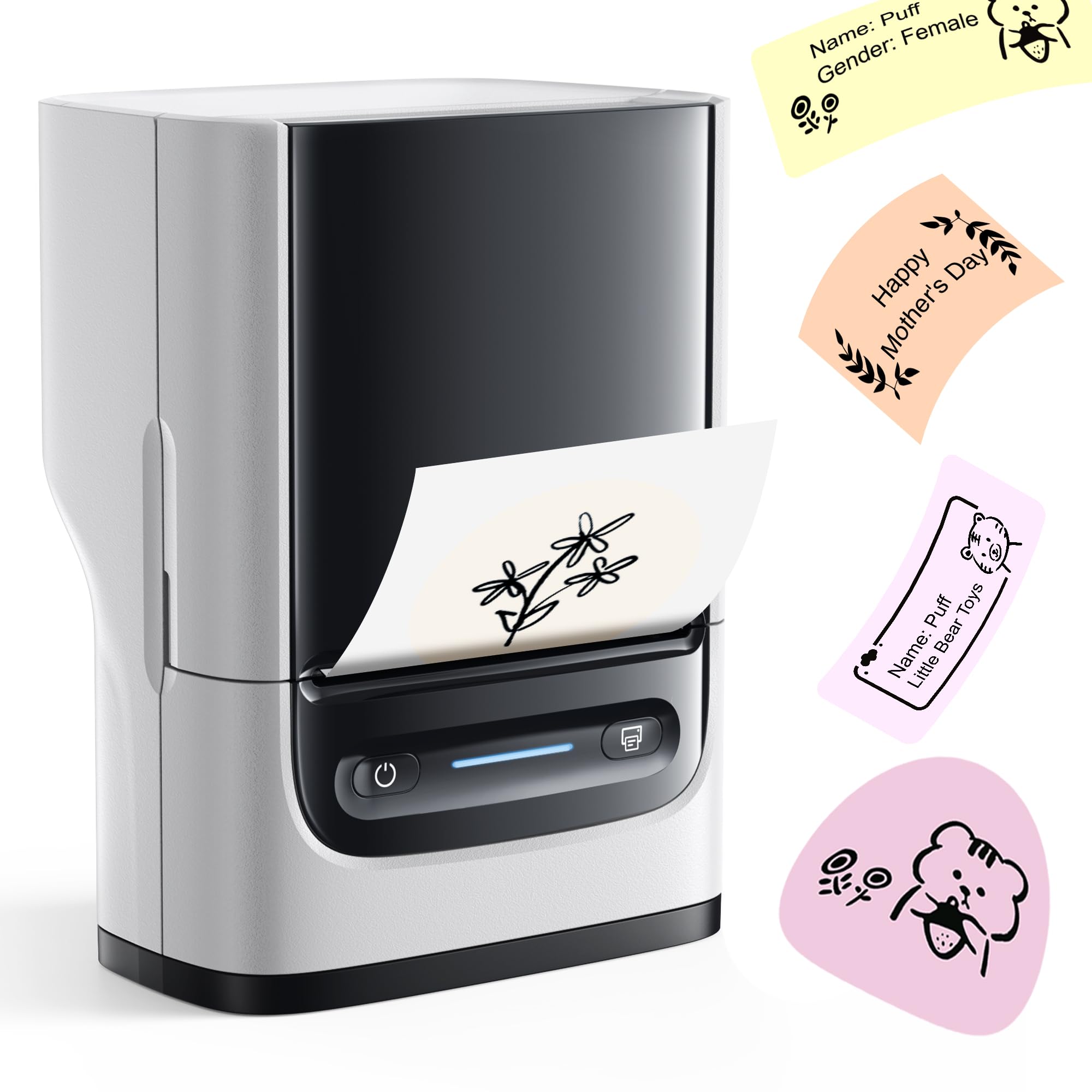
🖨️ Print Your Brand, Anywhere, Anytime!
The Nelko PM220 is a compact, Bluetooth-enabled thermal label printer designed for professionals who demand quick, high-quality labeling on the go. Compatible with iOS, Android, and PC, it offers customizable templates and supports label widths from 23 to 54mm. Its ink-free thermal technology delivers sharp 203 dpi prints, making it ideal for retail, clothing, barcodes, and home organization. With a sleek portable design and powerful app integration, the PM220 transforms everyday labeling into a seamless, stylish experience.




| ASIN | B0CVWZR8N1 |
| Additional Printer Functions | Print Only |
| B&W Pages per Minute | 45 |
| Best Sellers Rank | 3,055 in Business, Industry & Science ( See Top 100 in Business, Industry & Science ) 48 in Label Makers 72 in Labels & Labelling Equipment 5,335 in Climate Pledge Friendly: Shop All |
| Box Contents | 1 |
| Brand | Nelko |
| Brand Name | Nelko |
| Color Depth | 1 bpp |
| Colour | White |
| Compatible Devices | Smartphones |
| Connectivity technology | Bluetooth |
| Control Method | App |
| Controller Type | Android, iOS |
| Customer Reviews | 4.3 out of 5 stars 2,778 Reviews |
| Dual-sided printing | No |
| Duplex | No |
| Hardware Interface | Bluetooth |
| Ink Colour | White |
| Is Electric | Yes |
| Item Dimensions D x W x H | 13.4D x 8W x 10.3H centimetres |
| Item Type Name | Multifunction Printer |
| Item height | 10.2 centimetres |
| Manufacturer | Nelko |
| Maximum Copy Resolution Black and White | 203 dpi |
| Maximum Copy Resolution Color | 45 dpi |
| Maximum Print Resolution Black and White | 203 dpi |
| Maximum Sheet Capacity | 1 |
| Maximum print Resolution Color | 203 x 203 DPI |
| Media Size Maximum | 50mm |
| Model Name | PM220 |
| Model Number | PM220 |
| Model Series | PM |
| Model name | PM220 |
| Network Connectivity Technology | Bluetooth |
| Number of Drivers | 1 |
| Number of Trays | 1 |
| Other Special Features of the Product | Network-Ready, Portable |
| Output sheet capacity | 1 |
| Paper Size | 23-54mm |
| Print media | Labels |
| Printer Output Type | Monochrome |
| Printer Type | Thermal |
| Printing technology | Thermal |
| Processor Count | 1 |
| Product Warranty | 1 |
| Resolution | 203 x dpi |
| Scanner Type | Portable |
| Special feature | Network-Ready, Portable |
| Specific Uses For Product | Print labels |
D**X
Quick and easy to use.
This Nelko Thermal Label printer is absolutely fantastic for quickly making small clear labels. We use the 50mm rectangle labels that came with the printer to name and instruction labels for our son's equipment and devices for his day centre and when he is in hospital. The app is easy to use and the labels print clearly. It gets pretty good grey scale images from phone camera pictures resized and imported, instead of finding a suitable clip art image. The free clip art is good for a lot of items though. The printer connects easily via Bluetooth and uses automatic label sizing when using Nelko labels. It prints quickly and the labels stick very well and even hold up to sponge washing items they are attached too, such as a reusable metal drink cup. The printer has been great value for money for us, especially as it came with three rolls of labels and we haven't even got through one roll yet. It is still running on it's first full charge and I just take the top of it's retail box off and hold the power button when I need it. Then it is safely stored with the spare rolls and USB lead until it is needed again. So much easier than messing around with ink jet labels when you only need a few labels.
A**S
Great Label Maker
This label maker is so fun to use! The print quality is very good and the range of labels is ok. The label themselves are like a vinyl plastic so the are durable and near on impossible to tear which also makes them really easy to remove from bottles or jars without tearing. Connectivity is very good and it pairs with my phone via Bluetooth almost instantly. The accompanying app is great and has lots presets to use or it has all the tools to customise labels from scratch, it also lets you add photos which is a nice touch. Tip: don’t waste the first label of a roll by leaving just a few mm sticking out of the machine (see video) (Update) this label maker is absolutely great for making name tags for gifts, see photos also Jeff is my cat
I**N
This is a great piece of kit supported by a very "easy to use" phone app.
This is a great piece of kit supported by a very "easy to use" phone app. If it is tailor made labels that you want to produce, you need to look no further. This label maker has great functionality, enabling you to create various label types, the labels themselves are great quality and have excellent adhesion, so they remain in place. The device connects to the phone app with ease and once the label maker and phone are paired you can easily design and print your own label. Superb!
B**E
A reliable printer but I i wish the app could do more
I have been using this to print labels for a little while now. the pros are the ease of use here and the bluetooth app itself is user friendly too and it connects right away within 1 second of turning them on. I feel though that the print quality of smaller letters could be better seeing as it is laser thermal. that is with bold lettering. the device is pretty compact and fits in pockets and prints nicely with the right labels. One can change the size of the label one prints here which is handy. I just feel like i need more from this device. Some of the solid black squares can print out not so solid and dotty. Should't do this but hey well. It works for now until a better invention from the company comes out i guess
A**R
cheap toy
Says 203 dpi is worse than a 90 dpi printer. If battery is not full mis-prints faded nonsense. Phone software blurs image before sending it to printer, so it cant do things like QR codes.
S**S
Small, lightweight and easy to use, great features.
I have never had a label printer before and I’ve had so much fun! I love the size and weight of this and being wireless it really is so easy to hold in one hand (I have tiny hands) and use anywhere. It comes in sturdy and compact packaging, the instructions for basic set-up are easy to follow. The set-up is also simple and quick. The app for phone is easy to install and simple to use which is handy for me as I’m not very tech savvy. The app has lots of features to choose from for print subject. I particularly like the AI feature where you write a description of what picture you would like and it generates one for you that you can print if you like it. I have inc. a pic of an example, I asked for tiger under blossom tree. I have also included pics of examples of printed labels using other options but there are so many more. The video is to show how the performance is quick, smooth and not unnecessarily noisy. Although it’s not colour you can easily adjust the density, contrast and brightness of the print. The print is crisp and clear with no streaks or smudges if you choose the right density setting. Really good value for money, I will be labelling everything :)
K**K
Amazing little printer
Amazing label printer fast and efficient, makes great quality in no time easy to connect via Bluetooth to your phone either iOS or Android and can also be connected to your Mac or pc if you prefer. Has a sleek design compact build that is small enough to be put into a bag without taking loads of room .The Nelko app you use to create and print label from is easy to use and has several different templates for all different kinds of labels and size. the label are a sticky enough to stay attached to things and are also water and oil proof and don't leave any residue if removed. More Labels can be ordered from nelkos Amazon store inany different sizes to suit your needs with fast delivery.
D**H
I wish I had got this labeler ages ago
Amazon Review for Nelko PM220 Label Printer I had wanted a label printer for some time. I keep all sizes of screws etc. on shelves in my shed in containers left over from our Chinese take aways. Very handy but finding a particular sized screw or bracket is not so easy. Labeling each individual box of screws and brackets would make finding the correct size of screw or type of bracket very simple. I mentioned to senior management that these labelers would also be extremely useful for organizing anything in the kitchen; jams, other pots of sauces, anything. A labeler could help to organise sewing items, boxes of buttons, in fact there’s no end… I was allowed to look for a labeler. I chose the Nelko PM220. I’m so pleased I did. It seemed a pity to open the box when it arrived; it was so neat, wrapped like a very expensive mobile phone and about the same size. The box contained the labeler, a roll of labels, an instruction book, charging cable and instruction card. Loading the roll of labels was extremely easy. Plugging the Nelko into the computer was very easy but linking it to the computer via the app was a bit of a faff and I would be a liar if I said it wasn’t. But, after a number of false starts (and you know what they say, “As a last resort, read the instructions”) I did it. I registered and logged on to the Nelko website and followed the short video on YouTube. And if I can do it, believe me you can. Charging the labeler was a doddle. It needs to be fully charged before first use. While the Nelko was charging I brought some boxes in from the shed to start labeling them up, but the first thing I actually printed was a label for the Nelko labeler’s charging cable. How many cables have I lost because I can’t remember which cable goes with which item? Never again! Watching that first label emerge was extremely satisfying. Then I printed labels for boxes with screws in and others for boxes containing right-angled brackets. Brilliant. It is so easy. You can adjust size, font, position, anything and for good measure there are any number of templates and pictures. You can even print QR codes. I had another idea – I always retain the instruction booklets for power tools. And now I can organise them properly. I put each instruction booklet into separate Ziplock bags and printed out labels to identify each one. Voila! At first, I printed labels on my mac desktop then others on the iPhone using Bluetooth. Easy. It all worked a treat. I am sure that printing would be just as successful on a PC and Android. I can’t recommend this labeler enough.
Trustpilot
1 month ago
1 month ago