
DOWNLOAD THE APP


Customer Services
Copyright © 2025 Desertcart Holdings Limited
DOWNLOAD THE APP
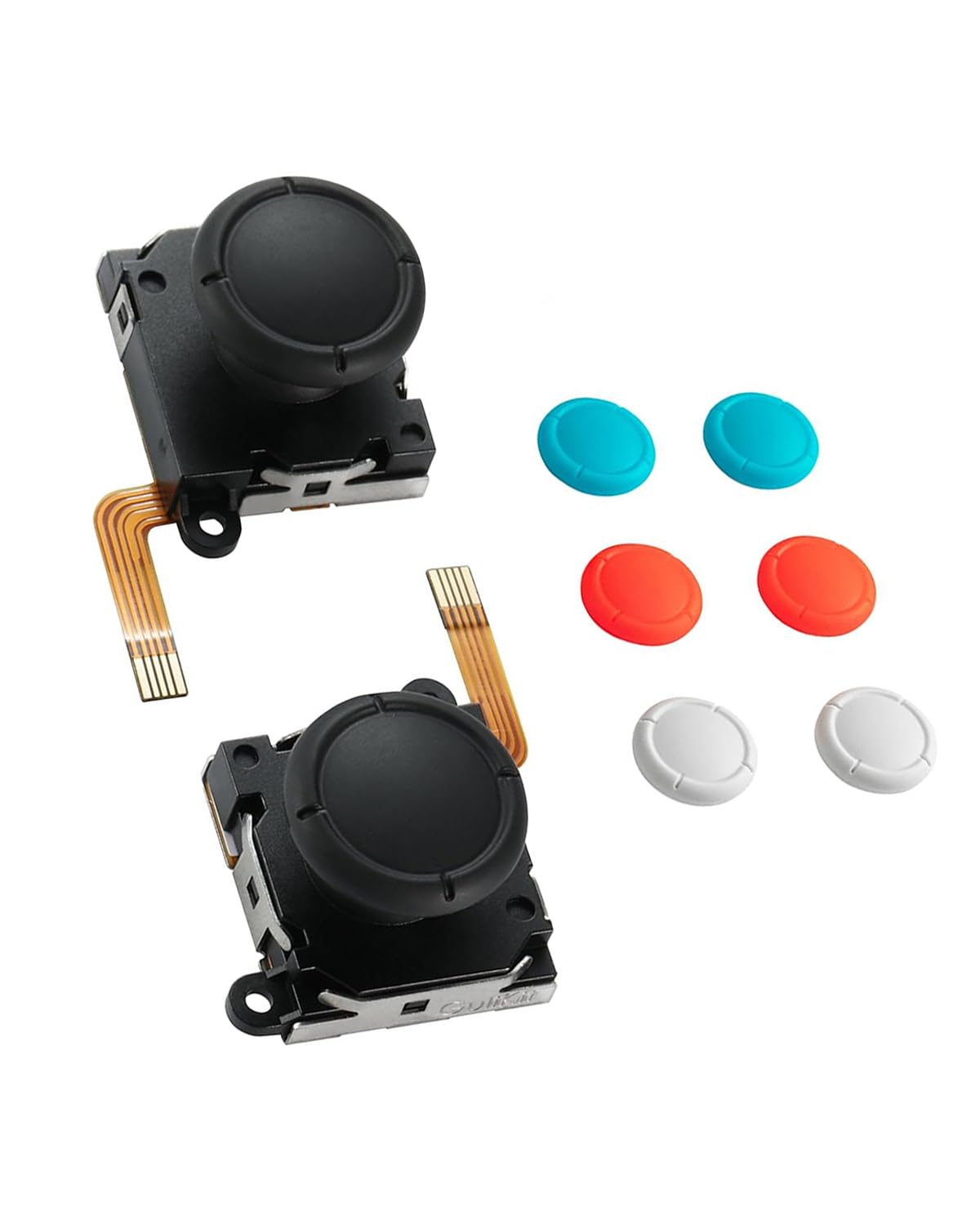
🎮 Elevate your Switch game with drift-proof precision and style!
The GuliKit TMR Joystick Upgrade Kit features patented Tunnel Magnetic Resistance technology that prevents joystick drift through contactless magnetic detection. Compatible with Nintendo Switch LCD/OLED Joy-Con and Switch Lite, it offers a modular, easy-to-install design with four interchangeable stick caps for personalized style. This upgrade delivers lower power consumption, enhanced stability, and high-resolution control, making it an essential performance boost for both casual and professional gamers.


| ASIN | B0DSJ5JDK9 |
| Amazon Bestseller | #1,132 in Video Games ( See Top 100 in Video Games ) #201 in Nintendo Switch Accessories |
| Batteries | 1 12V batteries required. |
| Country of Origin | China |
| Customer Reviews | 3.9 3.9 out of 5 stars (286) |
| Item model number | NS40T |
| Language | Japanese |
| Product Dimensions | 2.03 x 3.05 x 2.03 cm; 18 g |
| Rated | Suitable for all ages |
| Release date | April 2, 2025 |
F**A
ジョイコンのドリフトがひどくなったので恒久対策として購入 0番+ドライバーとフィルムハーネス脱着用のピンセットがあれば簡単に交換できました 交換後は設定でキャリブレーションを行うのを忘れずに 精度は期待通りで申し分ないです デバイスの特性上から起動時に反応しない瞬間がありますが、特段問題になることはありません
M**R
Solid, or so I thought.
So far so good! I especially like that the rubber caps don’t pop off as easily as the stock joysticks. Update after a few months: these sticks play great _but_ the linkage between the cap and stick is pretty fragile. We already snapped two specifically when putting the switch into the dock. So be mindful about alignment when docking and keep your switch in a case.
O**I
Magnetic sensor, precise fit, works great.
Works amazing. Huge upgrade over the stock joystick POTs. Magnetic sensors, so it’ll never wear out. However, be aware it will require soldering skills. Using a solder sucker tool was really effective for removing the solder from the posts. Follow the iFixIt tutorial! It’s great!
た**く
二個中一個が左にオーバーシュートしていて使い物にならない。ハンダ外し含めて時間もかかったのに、これじゃ苦労しても意味ないよね。
A**ー
問題無く交換、使用できました。
チ**ー
買う前に持っているコントローラーのジョイスティックを外してから買った方がいいと思います。私は持っている道具では外せませんでした。
さ**ず
聞けよ相棒。 俺のコントローラーはな、もう勝手に動き出す始末だった。 触ってねぇのに左に流れる。 センターに戻らねぇ。 まるで自分の意思を持ったかのようによ。 俺は言ったね。 「そんな勝手なヤツは放っておけねぇ」ってな。 だからこのTMR電磁式ジョイスティックに交換した。 結果? ピタッと止まる。 戻る。 言うことを聞く。 それでいいんだ。 だがな、完璧ってのはこの世にそうそう無い。 イマイチな点もある。 付属のスティックカバーが、俺の派手すぎるプレイについてこれず、取れちまった。 そりゃそうだ、俺は優しく撫でるタイプじゃねぇ。 だから接着剤でガッチリ固定してやった。 仲間は逃がさねぇ主義なんでな。 総合的には満足だ。 ドリフトに悩んでるなら、試す価値は十分ある。 ただし覚悟しろ。 お前のプレイが荒いなら、多少の工夫は必要だ。 評価は★4つ。 俺は星をケチる男じゃねぇが、正直も大事にする。 それが俺ってやつだ。
山**野
取り替え用のキャップも付いていて親切です
C**O
Ottimo prodotto perché si possono sostituire le leve dei Joy te ne danno 6 quindi se si leva la gomma puoi risolvere velocemente sostituendo
L**N
Joycons have horrible drift on startup, or when waking console. I have reseated the cable and calibrated them many times. Otherwise, they work well.
K**Y
TL;DR - These are the replacement sticks you want for the Joy-Con. Drifting or just want something that feels a little better, get the GuliKit TMR sticks. Putting an edit here early: At first I thought I had a faulty unit, and perhaps I do, but it's something I can easily work around. See, sometimes when I turn the Switch on, the stick in my left Joy-Con seems to want to flick left. No matter how much I calibrate it always does this intermittently but always happens. I've taken it apart, cleaned it to within an inch of its life, reinstalled it, and still had the problem. I connected my Joy-Cons to PC and found there is ever so slightly an amount of drift. How did I fix it? You're not gonna believe this...I moved the stick around a little bit. Then the problem went away. That's why I never saw it in the Switch calibration screen, it requires tilting the stick to go into the menu that shows actual stick readings which seems to fix the problem. Even on PC with a Joy-Con tool program, this fixed the problem. So if you're having some kind of weird drift on startup/wake despite calibration, just get in the habit of rotating the sticks when you turn the Switch on. You shouldn't see the problem anymore? I can't say if this totally fixes the problem, and it's a weird issue that shouldn't exist, but maybe it's an issue with this particular Joy-Con model or a slightly faulty stick module. But doing this feel surprisingly natural and I haven't had it do weird things since. Might be worth a try for you before you deal with a return/exchange (Especially if you installed these on a Switch Lite, god help you). If such a fix helps you, it's a minor annoyance but better than a broken stick that always drifts. Hopefully you don't have this problem for what this costs but it's such a small issue to me that I can't justify knocking any stars off and will for sure buy another pair for my secondary Switch Lite (Either when those OEM sticks start to fail or when these go on discount again). I dread taking apart the Switch Lite for that but these sticks do feel that much better than OEM where I will do it (For the love of god follow an iFixIt guide and reference a teardown video if necessary if you take apart the Joy-Con/Lite to do this yourself. These aren't too hard to take apart but all the tiny ribbons get really annoying really fast and you need to be prepared for how to deal with them). First a bit of history - I had gotten some Gulikit Hall Effect sticks (Not these ones) for the Joy-Con before and thought they were great, until I played games that required some precision with the sticks. Namely Assassin's Creed II and Shadow Generations. Then I noticed they were really bad. The sticks didnt seem to have a circular gate, but more of a teardrop shape with a point in a lower corner, and it's like I could feel all the mechanisms inside the assembly fighting each other. On top of that, trying to move the stick straight up would cause the game to read it as more of a curved line, making Ezio and Shadow turn a bit to the left before going forward, which is problematic at many points. I know when I just have a skill issue and this wasn't it, I've played both games before picking them up on Switch. I recalibrated dozens of times and nothing helped. It was clear I lost the stick lottery on those original Hall Effect sticks (And didnt notice before the return window so I guess I'm SOL on those. Oh well). So I replaced them with these. Major upgrade. These sticks feel smooth, with just the right amount of resistance to them. They feel a little tighter than the original OEM Joy-Con sticks and push back against your thumb just a bit more. Normally I like control sticks to have a frictionless feel but for small sticks with very little travel like the ones on the Joy-Cons, this is perfect. I dont even need a stick cap to extend the stick length and make the angles better for accuracy, they feel perfectly usable as-is with the regular OEM-style caps (Your mileage may vary but I went from using rubber caps on top of the OEM/Hall sticks to just regular out-of-the-box with these TMR sticks. Experiment for yourself but that was my experience). The stick has a proper circular gate rather than wanting to snap into a corner, and I dont feel any of the internal gears and cradles knocking into each other. And, most importantly, the directional readings are accurate, Ezio and Shadow stopped veering to the left during a forward input. This is exactly what I wanted to replace the drifting OEM sticks and then some, having a better feel and some customizability with the cap colors. Good stuff. The only downside to these are the install process and that's not a fault of the product itself. Just pay attention to the iFixIt guide for replacing Joy-Con sticks, have a little patience, and handle it as if it's a delicate expensive controller (which it is) and it should be okay. You do so at your own risk but it's not as scary as taking apart a 3DS, especially if you have expedience with ribbon cables already. Otherwise, if you're uncomfortable doing it yourself, you might be able to pay a small fee to have someone do it for you (Secondhand game shops might be willing to do it for you within a day if you bring them the controller and the parts and ask nicely. Especially if they already offer console/controller repair services). And it's a "flaw" you never have to think about again once the sticks are installed and function correctly, something that goes for any repair but always worth mentioning for those who arent expecting it. Adding an edit to these because ever since placing them in my joycons, sometimes in the Switch menus I'll get a stray left-input from the left joycon (I know it's that one since I see it do that on the controller connection screen). Idk if this is caused by the stick because the calibration screen shows that the stick centers properly with not deviation at rest (I've even recalibrated several times to make sure), and I've never noticed any issues in games. There's no stray button presses as far as I can tell either. I've taken it apart and cleaned every ribbon connector to see if it was that and the issue still persists. Still better than a drifting stick or one that reads incorrect directions while tilting in one direction, but still sad I didnt notice this until after the return/exchange window. Again, I dont even know if this is the stick itself, but the issue didnt happen until I replaced the stick with this one. The right joycon is completely fine. The only fix I have for it if to give the left joycon a good whack on the palm (Not directly on the stick, just on the side of the controller) and that makes it settle down. Still leaving the review at 5 stars but if I had the option, I would knock it down half a star because other than this issue, it seems perfect. Hopefully this is just a small case of bad luck on my end. I would still get these sticks again when it comes time to replace the modules in my Switch Lite.
W**Y
1er achat pour remplacer deux joystick de base atteints du drift, après montage et calibrage sur la console drift toujours présent et même encore plus fort ! Un lot défectueux ça peut arriver, je commande donc un 2e lot : toujours pareil... moins poussé mais toujours présent. J'ai tenter de les calibrer sous steam (car sur la console une fois calibré, à l'affichage tout va bien bien entendu), même soucis et la on se rend compte qu'en fait le centre du stick n'est clairement pas centré ! Normal donc le drift... A savoir qu'avec les manette d'origine je jouait sur steam sans aucune zone morte (la zone rouge sur la capture d'écran), la avec un décalage si élevé impossible de jouer. Même avec le test sur le site de la marque on voit qu'ils ne sont pas centrés... Bref il n'y aura pas de 3e lot, je pense que le mieux est encore de se faire raquetter par Nintendo en achetant encore un lot de joycon qui vont finir comme tout les autres a drifter au bout de 6 mois...
B**K
Joysticks where missing in package. Only joystick caps...
Trustpilot
4 days ago
1 week ago