
⌨️ Elevate your Mac setup with the keyboard that works as hard as you do.
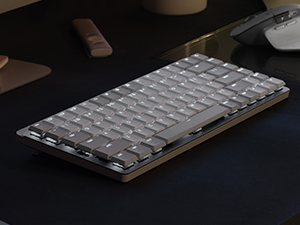
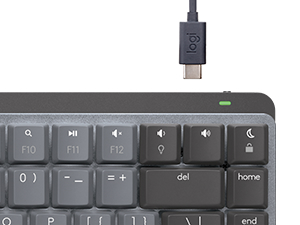
The Logitech MX Mechanical Mini for Mac is a compact, wireless mechanical keyboard optimized for macOS and iPadOS. Featuring low-profile tactile quiet switches, smart adaptive backlighting, and multi-device Bluetooth connectivity, it offers a premium typing experience with up to 10 months of battery life without backlighting. Designed with recycled materials and USB-C charging, it’s the perfect blend of sustainability, style, and professional-grade performance for the modern Mac user.








| ASIN | B09LK63PKB |
| Are Batteries Included | Yes |
| Batteries | 1 Lithium Polymer batteries required. (included) |
| Brand | Logitech |
| Color | Pale Grey |
| Customer Reviews | 4.3 4.3 out of 5 stars (482) |
| Date First Available | 20 August 2023 |
| Hardware Platform | Laptop, PC |
| Item Weight | 889 g |
| Item model number | 920-010553 |
| Lithium Battery Energy Content | 1500 Milliampere Hour (mAh) |
| Lithium Battery Packaging | Batteries contained in equipment |
| Manufacturer | Logitech |
| Number Of Lithium Ion Cells | 1 |
| Operating System | Android, Chrome OS, Ios,Mac, Linux, Windows 11, iOS 14, iPadOS 14, macOS 10.15 |
| Power Source | Battery Powered |
| Product Dimensions | 34.04 x 15.49 x 6.1 cm; 889 g |
| Series | MX Mechanical Mini Master |
M**W
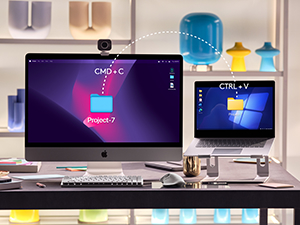
First of all, the seller that fulfilled my order was great- it's on Prime and the keyboard came new in its packaging. I was able to snag this keyboard at a 45% discount from the MSRP. For the keyboard itself: it's great! I'm happy with the purchase and it has a lot of benefits which I'll cover below. I actually have had the Nuphy Air75 v1, and if you're a heavy Apple/Mac user, you're likely looking between Nuphy, Logitech, LoFree, and Keychron for Mac-forward/specific keyboards. All offer wireless but have some differences between them. Are you a person who's looking to customize their keyboard to the extent of changing switches? Then you're going to go for Nuphy, LoFree, and Keychron. Nuphy is cheaper than Logitech at full price, and also cheaper than LoFree. But! LoFree is a nicer build out-of-the-box where the feeling and sound is better than Nuphy. In comparison, Keychron has more Mac-forward options and many options are cheaper than the other mentioned brands but lacks that portability the others have. All are solid keyboards with their pros and cons and again offer some great customization options. Keychron is cheapest (while still being heavily lauded), and then Nuphy is next (while also heavily lauded), then Lofree is the most expensive (while being most lauded) but it does offer a great typing experience and feel in comparison to the rest. Now back to this Logitech MX Mechanical Mini- does it offer the same customization down to the switch-level? Absolutely not. You cannot hot-swap on the Logitech. However, what it does the best is the incredible battery life (10 months w/o the backlighting) and the software/connectivity. An oft-complaint with Nuphy, Lofree, and Keychron is that on wireless, it will take time to have the keyboard turn on + connect (in the matter of seconds, some say 3-5 seconds and more/less). For Logitech, it has a nifty feature that turns on the keyboard as your hands come close and it quickly turns on/connects. The software is easy to use and you can customize buttons. It's also very easy to switch between devices on the Logitech keyboard. All say they can connect with different devices (at least 3) but Logitech has them beat on the connectivity of the keyboard. Now, you CAN customize the keycaps but certain keys have odd configurations and therefore cannot be replaced. Specifically, the space bar and maybe the right shift key. The Logitech space bar has a proprietary configuration and cannot be replaced (at least not easily). But I'd still recommend finding low-profile PBT keycaps. For a keyboard that retails at $150, it's a bit of a surprise that the keys that come with it are not PBT or higher quality plastic. These keys will display wear (and stuff like oil, etc.) much more quickly than PBT keycaps, and so I would recommend replacing them at some point. Besides that, PBT keycaps just feel better. So: are you a person looking for a good typing feeling with a keyboard that has great connectivity (and especially for switching devices/waking up the computer) and battery life that is also portable enough to take with you? And you don't care so much for customization of the switches and keys? Then Logitech is for you! However, if this was at full MSRP, I would hesitate and consider the other options. But at a discount, I think the Logitech is a sound choice and what I went with AFTER having the Nuphy Air 75 v1 (of which I never customized anyways). I liken this keyboard to being something that's office/professional-coded while giving you some of the benefits of mechanical keyboards. I think it looks fantastic and I'm happy with my choice!
K**Y
This keyboard is excellent and has been my travel keyboard for the last six month so I can be clicky on the go. Would def recommend.
R**K
Great keyboard. Space grey is a nice option Apple doesn’t offer. Smart Backlighting works well.
B**Y
Je l’adore
G**.
I love the new Logitech MX Mechanical keyboards, including this one. This keyboard integrates with the iMac 24" very well, with no connectivity issues on Bluetooth at all, very solid connection. Which brings up the fact that this keyboard does not come equipped with the Logitech Bolt USB dongle, as does its brother, the MX Mechanical. However, I have had zero issues, or delayed start up, while using the BT connection on this keyboard. The quality is very high, well made, and I really like the keycap material and feel. Typing is excellent, although this keyboard is equipped with "tactile" key switches, while very nice, do not have a "clicky" experience, but is more like Cherry MX brown type switches, with a tactile bump, but not really much of a click. Others have mentioned that they are somewhat stiff in operation, while I find them about average. I waited for this "Pale Gray" color way, and I love it. Not a huge fan of the darker/bi color keycaps of the original. I have had no issues with the key backlighting, as some have mentioned, mine works very well, and the key caps are very well, and uniformly lit, Logi did a great job here. It also has all the Apple/Mac keys you would want, including for display brightness, and key cap brightness, and the usual, volume up/down/play/pause. Nicely laid out, and easy to find everything. I find myself very much enjoying typing on this keyboard. It's like the keyboard that Apple should have made! Not a fan of the very short travel Magic keyboard keys. This is a great keyboard for your Mac, I know I love it for mine!
Trustpilot
2 months ago
2 weeks ago



