Desert Online General Trading LLC
Dubai, United Arab Emirates
Desert Online General Trading LLC
Dubai, United Arab Emirates

🔐 Secure Your Space, Connect with Confidence!
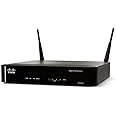
The Cisco RV220W Wireless Network Security Firewall combines advanced security features with high-speed connectivity, making it the ideal solution for small offices seeking reliable and secure network management.
G**R
A big step up from Cisco's Linksys models
I provide IT support to my many business clients and have used Linksys routers for both home and small business networks forever. I've watched them get progressively worse in terms of reliability (with the exception of the old workhorse WRT54GL) since Cisco bought them. I was looking for a better alternative that supported 802.11n and came upon this Cisco-branded model. It is specifically targeted for the small business network but also works well for an advanced home network (for example, remote access to my Windows Home Server). The RV220W setup is done from a browser instead of using half-a-measure software/browser methods like the Linksys models.Pros:1) It supports the 8-10 wireless devices I've got connected to it at any given time without shutting down like the Linksys.2) You can create a "guest" wireless network (VLAN) that doesn't have access to your internal wired/wireless network. Fair warning - you need some technical understanding of how those things work to set it up but the features are there to do it if you need it.3) I haven't tried VPN connections to the router yet but I know I can VPN out through them reliably using PPTP (the Linksys were hit-and-miss).4) I like the fact you don't have to register the unit to use it and get pestered to purchase support contracts like you do with most higher-end routers like the SonicWalls. There is a pay service (ProtectLink) to add some advanced filtering to the router but I have not tried it.And a couple cons:1) I couldn't add a simple url block without subscribing to the ProtectLink service. That's pretty basic and should be in there. Even the Linksys models can do that.2) My Gbit wired devices often connect at 100 Mbit. A driver update got one device up to Gbit but not every time. 100 Mbit is usually adequate, but I paid extra for this model to support Gbit - I think it might need a firmware update.All told, a good step up in reliability from the "consumer" models for a small business or advanced home network when you don't want to pay for ongoing maintenance contracts.
J**U
RV220W: It's getting there - sloooowwwly....
I bought the RV220W so that I could reach my home network from out on the road, through a VPN connection, without having to leave computers running 24x7 and connected to something like LogMeIn, etc.While initially infuriating, this device (two firmwares later) is now able to partically deliver what I bought it for, which was:- be a home wireless / internet firewall, with support for VPN access to the home network.It has a large feature set for the (under $300) device costs, and has some issues. VPN and SSLVPN is a problem to implement.How I use it (with firmware 1.0.2.4)*** It's a home based router for all the devices at home to go out on the internet-- Netgear Wireless G PrintServer WGPS606(? with 4 Eth ports)-- xbox 360 to WGPS606 Eth port, then to RV220W over Wireless G-- PS3 wireless to RV220W-- LexMark E250DN to Eth port on RV220W-- HP OfficeJet 7310 Eth port on WGPS606 then wireless G to RV220W-- IPhones to wireless G RV220W-- Dell XPS PC wireless G RV220W*** Its my SSLVPN via the RV220W VPN Setup-- Configured a free [...] registration (call it myvpn.dyndns.org)-- Works: IPhones - use native IPHone Cisco VPN config'd as PPTP. Setup up a VPN login associated with PPTP.--- RV220W prompts for changes needed to get PPTP enabled and working--- Set up two separate VPN IDs, one for SSLVPN (e.g. username) , one just for PPTP (e.g. usernamep)-- Works: Windows 7 x64 Ultimate with IE 9 - uses SSL VPN (with username account) into the RV220 via [...]-- No Workie: Windows 7 x64 with QuickVPN - fails during connect with ping failure.-- No Workie: Windows XP SP3 with QuickVPN - fails during connect with ping failure.-- Works: Iphone uses the PPTP vpn signon (e.g. with usernamep account), can VPN via PPTP then do remote sessions or "wake on LAN" to the DELL PC-- No Workie (yet): MacBook Pro - he's still waiting for his turn - the SSL VPN isn't working yet, and no QuickVPN for it either. Ah welll...-- Kinda Workie: some various Windows kiosks out there over SSL/VPN...Acid Test: Scan a document on my home network-enabled scanner from a remote Windows Kiosk's Internet ExplorerWhile at a bank, I was asked for a copy of a doc I didn't have with me. The manager and I walked up to one of their kiosk machines and I accessed home via SSLVPN client url. Had my wife place needed document on HP OfficeJet scanner and close the lid. I accessed my HP printer's internal interface web page (e.g. [...]) over vpn, which had a "scan" feature. Retreived the doc into the kiosk's IE, then printed to the kiosk's printer. Granted, the Kiosk was locked down, but I was able to add my site's URL as trusted, and import the Cisco cert into the Kiosk. Bank staffer was stunned stunned that this worked with just a router at home - no PC running 24x7 constantly connected...First SSLVPN startup stalled - Got the "signed app" block that people often get while at Kiosk. Cisco is apparently "unaware" of how to inform people to get around it. You add your site to that machines IE list of trusted nets, and add the certificate the cisco RV220W gives you. Then rerun the SSLVPN launch again - and the app installs. Granted, it did on this kiosk, neither you nor I can expect that to work in every case.QuickVPN is just not working for me - gotta laugh about it. Fails same way on multiple Windows versions I have, 64 and 32bit both. Stripped systems or systems with five VPN clients onboard. Think it's the router though, so looking at that as the problem. I see reports of supposedly "identical machines" having mixed success - so expect that.Remember, this is not a device costing a few thousand dollars... it's marginally more expensive than a standard Wireless Router/Firewall.The cost difference is your labor figuring out how to make this solution workable, or you paying for someone's time to make it work for you.I bought it in Mar 2011... and it's October 2011 by the time I got it working with stable firmware, decent internet throughput on my cable service, and SSL/VPN solutions I needed.It's taken 8 months to get it to a state where I'm using it full time. Almost as long as this post...If you buy this device, you better nerd up, more complex items like SSLVPN and VPN require work to set up. It's for the patient and those willing to invest effort to get what you need from it.Tal
D**G
It just works
Simple to configure.VPN works great!Web browsing is fast.Only draw-back is the interface is somewhat slow to load between pages when configuring. Other then that, I would recommend for a small business grade firewall.
W**N
Lan Works good and Wireless works OK
Hope it would be a lot better.Pros - Gigabit works well, getting it running (basic parts - Lan and Wireless) were quick. LEDs are nice to see what each port is doing (10, 100, 1000). Wireless range is good.Con - it is NOT simultaneous dual-band! I spoke to Cisco Sales before I bought and they said it was, it's not!. I have and HP Network printer that is DHCP and could not get it to work with RV220 but worked fine with many other routers. I had to set to static and could get to work. A lot of the software configuration on the web interface appears to be beta in level (to the extent that the interface would freeze and had to restart browser). I found it could not get the names for all the clients for DHCP, when looking at the management information for a list of clients. I had several cases when trying to use Cisco's QuickVPN software over wireless killed the wireless to the point I had to use a paper click to reset.I signed up on their Small business Support Community and saw many issues with this router.I am returning mine today as the price is way to high for beta level interface, non simultaneous dual band and have so many issues.
G**Z
Very dificult to setup VPN access from outside office
Many times after a certain number of connections from inside the office other find it difficult to connect.Setting it up for employees to access from other the issue is a huge challenge.They should have a 30 day return policy on this item, it's that frustrating.
Trustpilot
1 day ago
1 month ago
2 weeks ago
3 weeks ago