Desert Online General Trading LLC
Dubai, United Arab Emirates
Desert Online General Trading LLC
Dubai, United Arab Emirates


🚀 Elevate your mobile hustle—desktop power, pocket-sized.
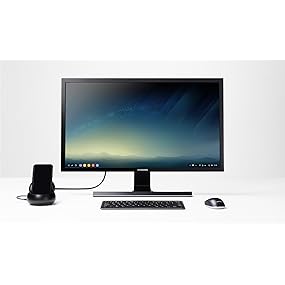
The Samsung DeX Station transforms compatible Galaxy smartphones into a desktop PC experience by connecting to an external monitor and peripherals via HDMI, USB-A, USB-C, and Ethernet ports. Featuring a built-in cooling fan and compact fold-flat design, it includes a fast charge USB-C wall adapter, making it an essential productivity hub for mobile professionals.



| Total Number of HDMI Ports | 1 |
| Total Usb Ports | 2 |
| Number of Ports | 5 |
| Hardware Interface | USB, USB Type C |
| Compatible Devices | Smartphones |
| Item Weight | 12.8 ounces |
| Item Dimensions L x W x H | 4"L x 4"W x 1.7"H |
| Color | Black |
A**R
It is awesome! But I am a geek and think things ...
Update 2: This is my review after playing with the DeX station for a week. I changed my rating as the review is for the product, not the dealer that provided it through Amazon--I was sent the UK version not the US version. The current dealer for the DeX Station is not the same one that sent me the wrong version. It still works however, just no warranty.I have tried other HDMI monitors and TVs, and as long as the TV/monitor has settings for adjusting the size and resolution, it works great!The DeX Station, really does turn your S8/9 smartphone into a usable desktop for Android applications. I use it every day, in addition to my regular desktops and laptops.I found that if I hook up my Note 8 to the DeX station without a bluetooth mouse connected, the latest versions of the Android OS, 8.x, will turn my smartphone into a touchpad. The touchpad works just like the touchpad on my MacBook Pro laptop.I have found that almost all applications will work, though there are a handful (most noteably from Amazon) that will not run under DeX mode. They do run fine under the mirroring mode.For browsing the web, reading email, writing notes, or anything else I already do on my Note 8, the DeX station with a bluetooth keyboard really does a good job. I would most certainly buy this again.----Update: I changed my rating from 4 stars down to 1 as what is shipped inside the box is NOT the US version, as indicated by a sticker on the box and the Amazon page. I am unable to register for the warranty because of this. As far as the product itself is concerned, my review below stands.----This is my review after playing with this for about an hour, with it hooked up to my Samsung Galaxy Note 8. It is awesome! But I am a geek and think things like this are really cool anyway.Regardless, what it does is turn your Samsung 8/9 into a usable desktop computer. Considering the capabilities of the Samsung 8/9 it ends up being a rather decent desktop. There is software built into the Samsung 8 and 9 that present a desktop like GUI. With a Bluetooth keyboard and mouse paired, you use it just like you would a laptop or desktop computer.I have found the some of the apps on the phone have actually been optimized to take advantage of being able to run in the larger screen. The rest, show up in a window with the same size as they normally would.Performance, that I have noticed, is not hurt by running apps in "desktop" mode.There is also a "mirror" mode that basically just shows a single window in the middle of the monitor that looks the same as the phones normal display.The only issue I have found so far, is with the two HDMI monitors I have tried so far. The one HDMI TV I tried results in the outer edges of the screen being cropped off, with the fonts being a little fuzzy. This really wouldn't be an issue, except that the status bar and icons on the edge of the screen are cut in half. I haven't been able to find a way to "fix" the resolution issues. Apparently it is something to do with the HDMI TV and it not being able to adjust the resolutions for the input.The other HDMI monitor I tried, which is a dedicated computer monitor, had no issues at all. Resolution was great and the fonts were nice and sharp.One other slight annoyance, is because I have my Note 8 in a thick rugged case, it will not fit into the little docking port on the DeX station--There is a more recent model of the DeX station where the phone lies flat, which I would have purchased instead but I didn't know it existed when I got this older model. I had to get a USB-C to USB-C extension cable (male-female connectors on the ends) to connect my phone up to the DeX station, to use it without having to take my phone out of the case. That solution works just fine for me.My Samsung Note 8 is quite a powerful device for it being a phone. Why not let it function as a desktop as well? It is by no means a gaming computer nor a development machine, but with this DeX station, it is really quite capable, and cool!
M**P
Ahead of its time, but not by much
I like this a whole lot more than I thought I was going to when buying it. I figured it was a gimmick, and it mostly is; however, it works surprisingly well (with a few caveats).The device itself is small and unobtrusive on your desk. You'll need a monitor, keyboard, and mouse (and plug-in) to make use of the dock. A laptop form-factor would be amazing similar to the old Motorola Atrix, but if you already have that available then it's not a huge deal. If you have to buy these then it certainly adds to the price. It keeps the phone charged while in use which is a great bonus.Ok, so how does it work? Well, you will never mistake this for a full computer. It offers limited functionality. You get to run (nearly) all of your apps on the phone, but not all of them are fully supported. Some are not able to be resized and a few won't run at all (although this seems to be limited to games or streaming movie apps). Apps like Microsoft Office have been optimized for the DeX and they work perfectly. Web browsing is much improved, with the single biggest complaint being Chrome insists on opening the mobile version of web pages until you click an extra button. The Samsung browser doesn't have this problem.Sending text messages works beautifully. Gmail works beautifully. Facebook, well it works but the window isn't resizeable and you are better off using it from the browser. Pinterest has the same problem. Amazon shopping app has the same problem. This is a real shame because a lot of the apps that don't scale correctly actually work pretty well on a tablet. They just can't handle the truly resizeable windows offered by DeX.The dock covers up the headphone jack and the speaker is buried in the dock. It would have been great if they included a headphone jack on the dock, but as-is you are limited to really muffled sound or using a Bluetooth speaker (which I assume is the preferred solution).Honestly, I'm not sure who this is for. If it was a small screen & keyboard similar to a laptop then I could see taking it on a business trip or something. For at home use, you're much better off using a full computer. For me, I like it for the rare occasion when I'm sitting at my desk, don't need my full computer but want something slightly better than the bare phone. They really need to get more app developers on board to unleash the full potential.With so many complaints, why the 5 stars? Because this has incredible potential and for the right use case it is fantastic. This also gives us the best glimpse at the future of computing. Phones have become powerful enough that they will replace desktops/laptops for a vast majority of people. Motorola tried it with the Atrix but was a way too early. Samsung is ahead of the curve, but the timing is much better.
R**N
Works Fine, But I'm Not Sure How Useful This Really Is
I ordered this recently as an impulse purchase when the price went under $100 but wasn't sure what I'd use it for. Last night my internet went out so I thought I'd give it a try.It does work as advertised. I quickly got it out of the box, connected to power, TV, and stuck in a mouse. (As I didn't intend to type, I didn't pull out my blue tooth keyboard). I tried to watch the show on Hulu we planned to watch over Roku before the internet went out and was disappointed to see that it only came up in a small windows. It was certainly possible to watch, but hardly ideal and we decided to put off watching until another time.As this was the first time I used it, I tried using the web browser for instructions to make sure that I wasn't missing some way to go full screen. While I would use a full keyboard if using this longer, as I didn't have it handy I did use the on screen keyboard for a simple internet search on using the DeX, and this did work.Basically this works, but I'm not sure how useful it will be. I do plan to throw it in a suitcase when traveling, figuring that if I have trouble with the notebook I travel with it does give me an additional option, taking up very little additional space (assuming I bring along and HDMI cable, keyboard, and mouse). At this time I couldn't see taking this as the primary computer, but I imagine some people might. This would be far more useful if video apps could be seen full screen.
Trustpilot
1 day ago
1 month ago